Evolution API vs WhatsApp Cloud API in 2026: terms, ban risk, cost and the move to the official API
Editorial team · updated · facts checked
Evolution API is an open-source REST server for WhatsApp with two connection modes. Its WhatsApp Web mode logs in to a WhatsApp account through Baileys, an unofficial library; WhatsApp's terms forbid that kind of automated use, and the number can be banned. Its second mode wraps Meta's official Cloud API, which follows Meta's rules and bills per template message ($0.0068 per utility message to Brazil).
For anything customers depend on, such as order updates, payments or login codes, use the Cloud API, directly or through a provider. Take the WhatsApp Web risk only with a number you can afford to lose.
We read every source on this page on 24 September 2026, from the Evolution API repository to WhatsApp's terms and Meta's rate cards, plus the directory's data on 17 WhatsApp API providers that serve Brazil. We did not install Evolution API, pair a number or send messages.
What Evolution API is
Evolution API is a Node.js and TypeScript server published by Evolution Foundation, whose website and documentation are in Brazilian Portuguese. Its repository moved from the EvolutionAPI organization to evolution-foundation/evolution-api, where it had 9,675 stars on 24 September 2026. The latest stable release is 2.3.7 (5 December 2025); 2.4.0 has been a release candidate since May 2026.
You host it yourself. Each number is an "instance", and its integration field decides how it reaches WhatsApp.
WhatsApp Web mode (WHATSAPP-BAILEYS). The README lists it first and calls it free; in Brazil this route is searched for as API não oficial ("api não oficial whatsapp" draws about 200 searches a month, per Ahrefs in September 2026). Baileys is a WebSocket library for WhatsApp Web; its README says WhatsApp's multi-device API lets it be "authenticated as a second WhatsApp client by scanning a QR code or Pairing Code". Its disclaimer says it is not "authorized, endorsed by, or in any way officially connected with WhatsApp". It also discourages "bulk or automated messaging usage". Evolution's connect endpoint returns that QR code or pairing code for your phone.
Cloud API mode (WHATSAPP-BUSINESS). Evolution's Cloud API page asks for your Meta app's permanent token, phone number ID and business account ID, and sets "qrcode": false because the integration "é baseada em token, e não em QR Code" (uses a token, not a QR code). Here Evolution is a self-hosted layer in front of Meta's API, and Meta's rules and prices apply as if you called Meta directly.
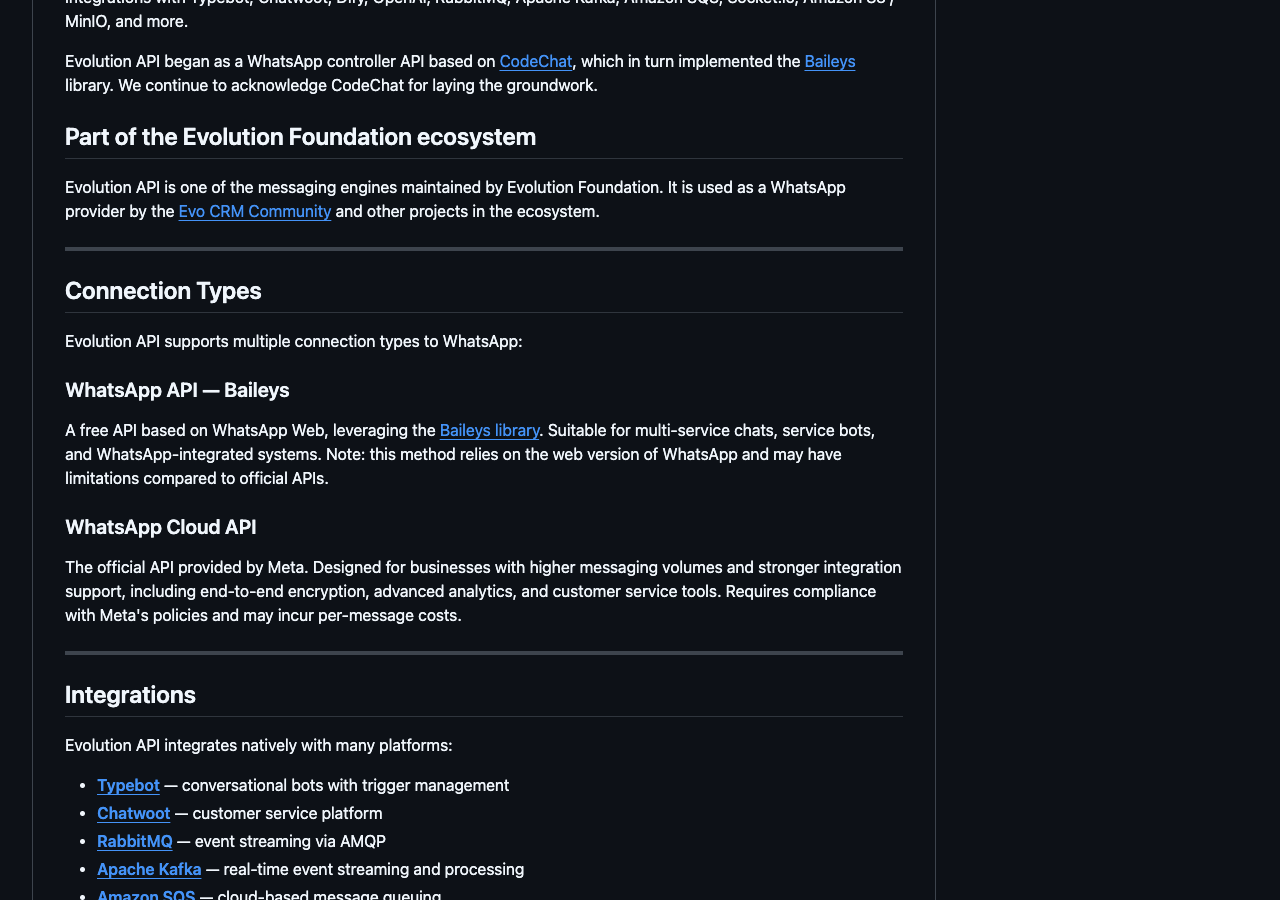
The README's warning is mild: the Baileys mode "may have limitations compared to official APIs", and we found no page on account bans or WhatsApp's terms in the full documentation export. The foundation's second engine, Evolution Go, runs on the whatsmeow library and connects only through WhatsApp Web.
Before you deploy it, check:
- License. The LICENSE file adds conditions to Apache 2.0: keep the logo in the console and show administrators "a clear notification" that Evolution API is in use, or you may need a commercial licence. The licensing page says Apache 2.0 "sem cláusulas adicionais" (without additional clauses). If you ship Evolution inside a product, ask which text applies.
- Telemetry. Anonymous telemetry is on by default (
TELEMETRY=true). From 2.4.0, a free licence activation asks for an email and phone number, then reports aggregate message counts, enabled features and the server's IP; the docs say message content and contacts are not sent. - Your data. The documented
DATABASE_SAVE_DATA_*settings store messages, contacts and chats in your PostgreSQL or MySQL database, so customer conversations sit on a server you answer for under Brazil's LGPD.
What the WhatsApp Cloud API is
The Cloud API is Meta's own API for the WhatsApp Business Platform, run on Meta's servers. Your number is registered on the platform instead of linked to a phone. Outside the 24-hour window that opens when a customer writes to you, you may send only templates Meta has approved, and Meta bills each delivered template by category and the recipient's country.
You can call it directly with your own Meta app (our Cloud API tutorial sends the first message) or through a provider, a Meta Solution Partner or Tech Provider that onboards you through Embedded Signup and adds its API, dashboard, support or billing. The 17 providers in our WhatsApp API rankings sell this access; the WhatsApp Business API guide covers verification and templates in depth.
Evolution API vs WhatsApp Cloud API: comparison table
Evolution's Cloud API mode belongs in the right-hand column, plus the cost of running Evolution.
| Evolution API, WhatsApp Web mode (Baileys) | WhatsApp Cloud API (direct, through a provider, or Evolution's Cloud API mode) | |
|---|---|---|
| Who makes it | Evolution Foundation, built on Baileys, which says it isn't affiliated with WhatsApp | Meta |
| WhatsApp's terms | Linking an account to an unofficial client violates the Terms of Service, per WhatsApp's help center | The API WhatsApp offers businesses; governed by the WhatsApp Terms for WhatsApp Business Platform |
| Ban risk | The phone number can be banned, temporarily or permanently; review is requested in the app | Warnings, then template and sending blocks of 1 to 30 days, account lock, offboarding; appeals in Business Support Home |
| Cost in Brazil | No per-message fee; you pay for a server (R$19.99 promotional to R$54.98 at HostGator, $12 at DigitalOcean) | Meta: $0.0068 utility, $0.0625 marketing per delivered template; a provider may add a fee |
| Templates and opt-in | No templates; WhatsApp's consumer rules say to message only people who contacted you or asked you to | Approved templates outside the 24-hour window; documented opt-in that names your business |
| Pairing and devices | QR code or pairing code as a linked device; up to four per account; logs out if the phone is unused for 14 days | No QR code; the number is registered on the platform; a Business app number can keep its app through coexistence |
| Hosting | You run Node.js 20+, PostgreSQL or MySQL, and Redis | Meta hosts the API; you host a webhook endpoint (and Evolution, if you keep it in front) |
| Support | GitHub issues, community, email; paid support with an SLA offered | Meta developer support and forum; your provider; Direct Support tickets for partners |
| Providers in Brazil | None involved | 17 in our dataset; see the Brazil WhatsApp ranking |
What WhatsApp's terms say about unofficial APIs
WhatsApp's Terms of Service (effective 4 January 2021) forbid "bulk messaging, auto-messaging, auto-dialing, and the like" and "any non-personal use of our Services unless otherwise authorized by us". They also forbid making the service available "over a network where they could be used by multiple devices at the same time", except through WhatsApp's own tools, and offering third parties "software or APIs that function substantially the same as our Services".
If the number you link runs the WhatsApp Business app, that app has its own terms, and the version effective 23 September 2026 is blunter:
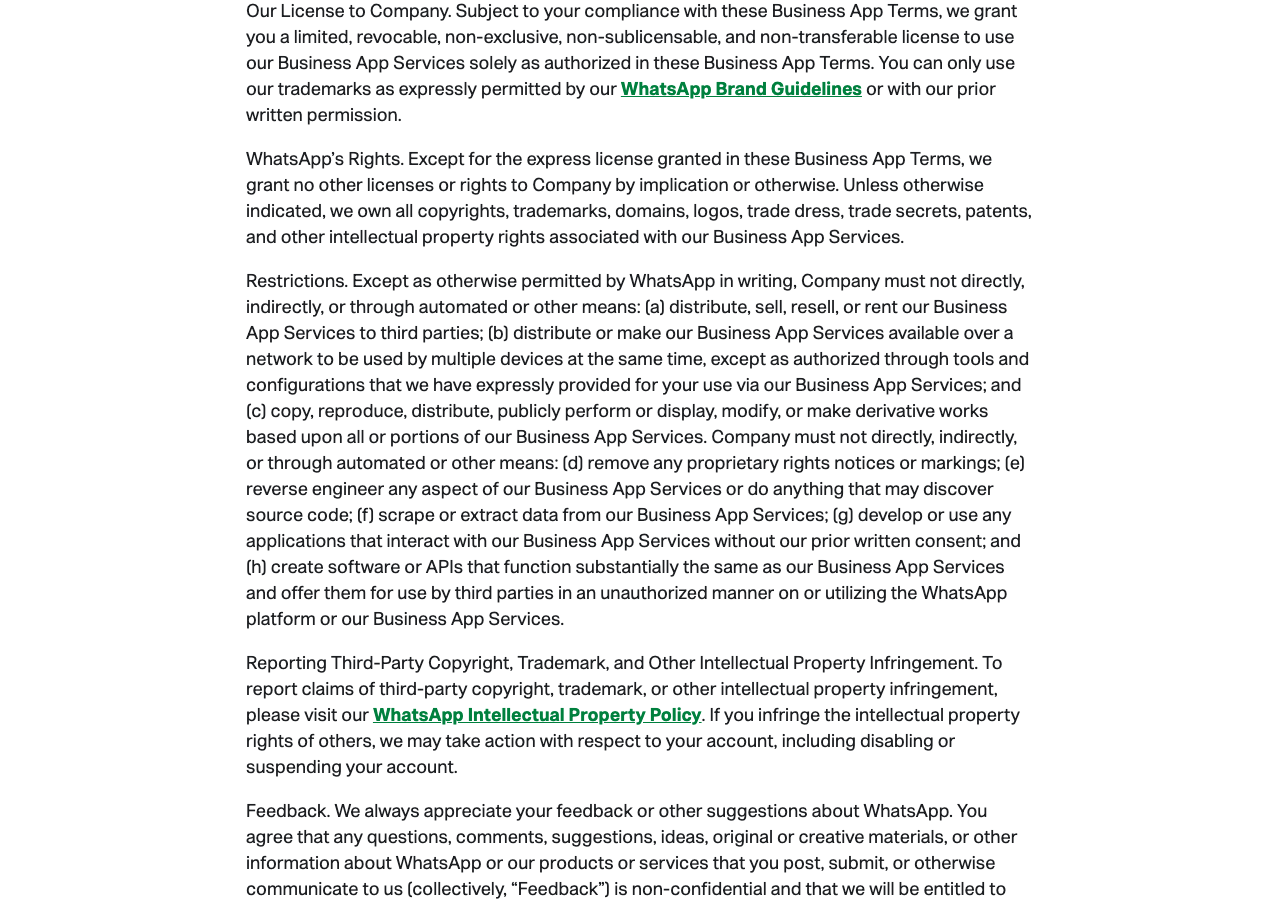
Clause (g) bars you from using "any applications that interact with our Business App Services without our prior written consent". On our reading, a server driving the account through WhatsApp Web is such an application. The help center says the same about clients like Baileys: linking your account "to unofficial versions of WhatsApp violates our Terms of Service", and doing it "now or in the past" may bring a temporary or permanent ban.
Our reading, not legal advice: nothing in these terms exempts your own number, low volume, or messages only to people who know you. Evolution's Cloud API mode is different; it calls Meta's API under the Business Platform terms.
Ban risk: what happens to the number
The ban lands on the phone number, not your server. WhatsApp says an "unauthorized application and/or unsupported device" can get an account banned, and that it can reinstate a lifted ban if the activity continues. A "Temporarily banned" message can mean an unofficial app or scraping; ignoring it can make the ban permanent.
Per About account bans, "You can't access your chat history or backups while your account is banned." You request a review in the app, and most are decided within 24 hours; if the option doesn't appear, "the ban is final". WhatsApp also bans accounts "that are reported multiple times". Since 7 December 2019 it has said it takes legal action against companies engaged in or assisting automated or bulk messaging.
Unverified user reports in Evolution's issue tracker show the pattern:
- #2497 (4 April 2026): two long-used numbers banned right after the QR scan on 2.3.7, before any message was sent.
- #2693 (15 August 2026): an instance answering only inbound support questions was cut off with
401 device_removedand a 24-hour restriction. - #2228 (open since 15 November 2025): bulk use of the Check WhatsApp Numbers endpoint can get the account banned; WhatsApp lists scraping of phone numbers as a ban reason.
The Cloud API has enforcement too, tied to what you send rather than the client you use. Meta's policy enforcement page lists a warning, 1- or 3-day template blocks, 5-, 7- or 30-day blocks on all messages, an account lock lifted only on appeal, and offboarding; scams skip straight to offboarding.
Cost in Brazil: Meta's rates vs self-hosting
Meta's USD rate card effective 1 July 2026 charges per delivered template to a Brazilian (+55) number: $0.0625 marketing, $0.0068 utility, $0.0068 authentication. Accounts billed in reais pay R$0.3217, R$0.0350 and R$0.0350, invoiced by Meta's Brazilian entity. The October 2026 card leaves Brazil's rates unchanged, per our WhatsApp API pricing breakdown.
Replies change on 1 October 2026. Free-form replies inside the 24-hour window are free until then; afterwards each business number gets 1,000 free service messages a month and pays the utility rate beyond that, per Meta's pricing page (updated 10 September 2026). Without a payment method, Meta stops delivering replies after the free 1,000.
Evolution's WhatsApp Web mode pays Meta nothing; you pay for a server:
- HostGator Brasil, Evolution's hosting partner (the README's hosting link redirects to a HostGator affiliate page), advertises "a partir de R$ 19,99/mês" with Evolution preinstalled, a prepaid discount. The same page's price data lists R$54.98 a month as the regular price of the 2 GB plan, which Evolution's docs rate at up to 20 instances; renewals are billed at the regular price.
- DigitalOcean, as a generic option: 1 vCPU and 2 GiB for $12.00 a month.
A worked scenario for a Brazilian store on one number, from October 2026: 1,000 order updates a month as utility templates, plus 3,000 replies to customers.
- Cloud API direct: 1,000 × $0.0068 + (3,000 − 1,000) × $0.0068 = $20.40 a month to Meta.
- Through a provider, or Evolution's Cloud API mode: the same $20.40, plus the provider's fee or your server.
- Evolution's WhatsApp Web mode: $0 to Meta, plus a server at about $12 or R$55.
The unofficial route saves about $20 a month here, and risks the number your customers know.
Templates, opt-in and the 24-hour window
On the Cloud API, anything sent outside the customer service window must be an approved marketing, utility or authentication template. Meta requires opt-in that says the person is opting in to messages from your business, by name; it can be collected on a website, by SMS, by phone or on paper.
The WhatsApp Web mode has no templates and no window, so nothing technical stops a message to anyone at any time. That freedom is what the consumer terms forbid: WhatsApp's guidance is to message only people "who have contacted you first or have requested you contact them on WhatsApp".
QR pairing vs number registration
A Baileys session occupies one of the four linked devices an account may have, and linked devices "will log out if your phone is unused for over 14 days". Your phone remains the primary device.
The Cloud API has no QR code. The number is registered on the platform, and Meta's phone number rules say numbers "already in use with WhatsApp cannot be registered unless they are deleted first". The exception is coexistence: a WhatsApp Business app number (version 2.24.17 or later) connects to the Cloud API through a partner's Embedded Signup and keeps working in the app, with a fixed 20 messages per second, up to six months of chat history synced, no group chats and broadcast lists turned off. Messages sent from the app stay free.
Hosting and support
Evolution installs with Docker, NVM, SetupOrion or Easypanel (its installation docs cover each), and updates are yours to apply. Help comes from GitHub (227 open issues and pull requests on 24 September 2026), the community and a support email; the foundation also sells support with an SLA. On the Cloud API, Meta's support page offers developer support, a forum and bug reports, keeps Direct Support tickets for partners, and sends customers of a provider to that provider.
When the unofficial route is a risk you can take, and when it isn't
WhatsApp's terms make no exception for small or internal use, so the only questions are whose risk it is and what you lose if the number goes.
A risk some people take: a prototype on a spare prepaid chip, alerts from a home server to your own phone, a small internal bot for people who asked to join it. These are tolerable because the number is disposable, nobody depends on it, and nobody who didn't ask receives anything.
Not acceptable:
- Customer messaging at scale. Campaigns, order notifications, a support line customers know. This is the bulk and automated messaging the terms name, and a ban takes the chat history with it.
- Payments. Payment links, Pix codes and receipts need a sender that won't vanish mid-collection, and Meta's Payments API for Brazil (Pix, payment links, Boleto) exists only on the Business Platform. Our text-to-pay guide covers payment links by WhatsApp, SMS and email.
- Login and one-time codes. If the sender is banned, nobody can sign in. On the Cloud API only authentication templates may carry one-time codes; our OTP channel comparison covers costs and fallbacks.
- Selling instances to clients. On our reading, reselling WhatsApp Web instances is offering third parties software that works "substantially the same" as WhatsApp, and it moves the ban risk onto your clients' numbers.
- AI chatbots for a business. An agent on a linked device receives every chat on the account, personal ones included. Our AI agent on WhatsApp tutorial builds the bot on the official API.
Evolution API, WhatsApp Web mode
Pick it for a personal project on a number you can lose. Cons: against WhatsApp's terms; a ban removes the number and its history; no templates or official delivery webhooks; you run, secure and update the server; the licence text needs checking. Not a fit if customers, payments or logins depend on the number.
WhatsApp Cloud API (direct or through a provider)
Pick it for any business use. Cons: a fee per delivered template, and from October 2026 per reply above 1,000 a month; templates need approval; a new portfolio reaches only 250 people a day outside the window until verification or good quality lifts it to 2,000 (messaging limits); moving a number already in WhatsApp takes planning. Not a fit if you want to automate a personal account; no official route exists for that.
How to move from Evolution API to the official API
- Choose direct or a provider. Direct has no provider fee, but tokens, webhooks, templates and billing are yours. A provider adds onboarding and support, often an inbox, sometimes billing in reais.
- Decide what happens to the number. A new number is simplest. A number in use in WhatsApp must be deleted from the app first, unless it's a Business app number connected through coexistence, which only a Solution Partner or Tech Provider can offer. A banned number "must be unbanned via the appeal process first". Onboarding with coexistence unlinks every companion device, so stop the Baileys instance before you start.
- Verify your business. New portfolios start at 250 recipients a day outside the window; business verification is one of Meta's routes to 2,000.
- Rewrite outbound messages as templates. Order updates become utility templates, promotions marketing, login codes authentication. Meta's categorization rules count "an order update with a promo" as marketing, about nine times the utility price in Brazil.
- Collect opt-in that names your business, and record when and how.
- Keep your Evolution code if you like. An instance created with
WHATSAPP-BUSINESSkeeps Evolution's REST endpoints on top of the official API, with your own Meta app and token. That is the direct route, and you still host Evolution.
Illustrative code, written from the official documentation and not run by the editorial team.
{
  "instanceName": "loja-oficial",
  "integration": "WHATSAPP-BUSINESS",
  "qrcode": false,
  "token": "PERMANENT_SYSTEM_USER_TOKEN",
  "number": "PHONE_NUMBER_ID",
  "businessId": "WHATSAPP_BUSINESS_ACCOUNT_ID"
}
Per Evolution's Cloud API page, the body goes to POST /instance/create, and Meta's webhook points at /webhook/meta, checked against WA_BUSINESS_TOKEN_WEBHOOK in your .env. Keep the token on the server.
WhatsApp API providers for Brazil, in our rating order
All 17 WhatsApp providers in our dataset list Brazil as available. They are ordered by the site's current country rating for WhatsApp in Brazil (methodology 2026.09-pre), with the weights published on our methodology page: local pricing 25, developer and AI readiness 25, reputation 20, local market fit 15, channel functionality 10, compliance transparency 5. Coverage is the share of that weight backed by verified facts; unknown criteria are reweighted, not scored as zero. The live order is on the Brazil WhatsApp ranking.
The cost column is one scenario: 1,000 utility templates to Brazilian numbers in a month, including Meta's $6.80 where the provider passes it through. Bundled prices include Meta's fee without showing it and aren't directly comparable.
| Place | Provider | Score (coverage) | 1,000 utility templates to Brazil | Bills in reais | Support in Portuguese |
|---|---|---|---|---|---|
| — | Meta Cloud API, direct (not rated) | — | $6.80 | For accounts whose Sold-To country is Brazil | Not stated |
| 1st of 17 | SendPulse | 79.7 (80 %) | $21.80: $12 Chatbots Pro plan + $0.0098 each (bundled) | Currency not recorded; Pix, Boleto | Yes |
| 2nd of 17 | Brevo | 74.5 (77 %) | R$2,751.04: Professional plan R$2,710 + R$0.041 each (bundled) | Yes | Yes |
| 3rd of 17 | Infobip | 72.7 (77 %) | $9.91 (bundled) | No (EUR, USD) | Not recorded |
| 4th of 17 | Vonage | 72.5 (87 %) | $8.99 | No (EUR, USD) | No |
| 5th of 17 | Telnyx | 72.1 (94 %) | $10.80 | No (USD) | No |
| 6th of 17 | Bird | 69.8 (76 %) | $11.80 (bundled) | No (USD, EUR) | Not recorded |
| 7th of 17 | WATI | 66.9 (80 %) | R$369 Growth plan + US$0.00918 each (bundled) | Yes | Yes |
| 8th of 17 | AWS End User Messaging | 66.4 (93 %) | $10.20 (Meta's fee billed from its INR card) | Yes | No |
| 9th of 17 | Blip | 66.0 (82 %) | R$1,010 on Blip Go, a Business app number via coexistence (bundled) | Yes; Boleto | Yes |
| 10th of 17 | Sinch | 64.6 (74 %) | Not published | No (USD, EUR, GBP) | Not recorded |
| 11th of 17 | Twilio | 62.1 (93 %) | $11.80 | No (USD) | No |
| 12th of 17 | Gupshup | 62.1 (89 %) | $7.80 | No (USD) | Yes |
| 13th of 17 | 360dialog | 61.6 (95 %) | $65.80: $59 per number + Meta's fee | No (USD, EUR) | Yes |
| 14th of 17 | Zenvia | 60.1 (84 %) | R$0.47 to R$0.55 each in prepaid packages (bundled) | Yes; Boleto | Yes |
| 15th of 17 | Botmaker | 58.2 (81 %) | R$600 Standard plan; template fees not printed | Yes; Boleto | Yes |
| 16th of 17 | Plivo | 48.8 (76 %) | $7.50 of usage, $1,000 monthly minimum | No (USD) | Not recorded |
| 17th of 17 | Treble | 44.6 (58 %) | From $399 a month; message fees not published | No (USD) | Yes |
Tied scores are ordered by coverage, as the rating does. Prices were checked on 23 and 24 September 2026, in the currency each provider prints; "Not recorded" means the dataset has no verified value.
SendPulse's place, and the case against it
SendPulse places 1st of 17 in this rating. It gets full marks for local market fit (Pix and Boleto payment, Portuguese support, a Brazilian sales phone line), as do Blip and Treble, and the highest score for WhatsApp features. Before you shortlist it on rank alone:
- Its place is sensitive to the weights. When we wrote this page on 24 September 2026, a recalculation with the developer and AI weights in force before that day's changes listed on our methodology page (more weight on MCP servers and OAuth) would have put Vonage first at 73.8 and SendPulse third at 73.6, level with Brevo but behind it on coverage.
- Part of the weight is unverified. Coverage is 80 %: its price is bundled, so the rating can't compare most of its pricing component, and its Brazilian billing currency and local invoicing are unknown.
- WhatsApp needs a paid chatbot plan. Chatbots Pro starts at $12 a month for 500 subscribers (US-visitor price; the price shown in Brazil couldn't be read) and grows with the subscriber count.
- Its per-template price hides Meta's share. $0.0098 per Brazilian utility template is $0.0030 above Meta's list rate.
If you only need an API behind your own inbox, a provider that passes Meta's fee through at cost, such as Vonage, Gupshup or Telnyx, may fit better. Building with an AI coding tool? The AI-readiness dataset shows which providers publish MCP servers and agent skills, and our WhatsApp MCP article separates them from WhatsApp Web bridges.
Related guides
- WhatsApp Business API guide: access, verification, templates, Brazil's BRL billing
- WhatsApp Cloud API tutorial: first message and webhooks on the direct route
- WhatsApp Business API pricing in 2026: Meta's rates and provider fees for the US, Brazil and Mexico
- WhatsApp business verification: the documents and steps that raise your messaging limit
- WhatsApp MCP servers: official servers vs WhatsApp Web bridges
- WhatsApp API provider rankings and all provider cards
About this guide
The PingMyUsers editorial team wrote this comparison for developers who found Evolution API first and want to know what the official route costs; Sensaria AG in Switzerland operates the directory. Providers do not pay for placement, and none reviewed this page. This is not legal advice: quotes are WhatsApp's and Meta's own words, and our readings are marked as ours. To report an error, email contact@sensaria.ch with the page and the source that shows the correct fact.
Methodology
On 24 September 2026 we read the sources listed below: Evolution API's repository, issues and documentation, the Baileys README, WhatsApp's terms and seven help-center articles (rendered in a headless browser), Meta's developer pages and USD and BRL rate cards, and two hosting price pages. Provider rows come from the directory's dataset and its computed Brazil WhatsApp rating. We did not install Evolution API, link a number or send a message. The question list reuses three earlier rounds of AI-search query research (287 queries kept); none named Evolution API, so those sections rest on primary sources.
Last updated
24 September 2026: first version. Next check when Evolution API 2.4.0 leaves release candidate, after Meta's 1 October 2026 changes, and by March 2027 at the latest.
Frequently asked questions
Is Evolution API an official WhatsApp API?
No. Evolution API is an open-source project by Evolution Foundation. Its WhatsApp Web mode runs on Baileys, which says it isn't affiliated with WhatsApp. Its Cloud API mode calls Meta's official API, but Evolution itself is still third-party software you host.
Can my number get banned for using Evolution API?
In the WhatsApp Web (Baileys) mode, yes. WhatsApp says linking an account to an unofficial app "now or in the past, may result in a temporary or permanent account ban", and a banned account loses access to its chat history and backups. The Cloud API mode avoids that risk; Meta's enforcement there depends on what you send.
Is Evolution API free?
The software is free to self-host. You pay for a server (R$19.99 to R$54.98 a month on Evolution's partner host, $12 at DigitalOcean), plus Meta's per-message fees in Cloud API mode. From version 2.4.0 a free licence activation asks for an email and phone number and reports usage counts.
What is the difference between Evolution API and the WhatsApp Cloud API?
Evolution API is a server you run; the Cloud API is Meta's hosted API. Evolution's WhatsApp Web mode drives an ordinary account through a QR-linked session, with no templates or Meta billing; the Cloud API uses a registered number, approved templates and per-message pricing.
Can I use Evolution API with the official WhatsApp Cloud API?
Yes. Create an instance with the integration WHATSAPP-BUSINESS and your Meta token, phone number ID and business account ID, then point Meta's webhook at /webhook/meta. Meta's rules and prices apply, and you still host Evolution.
How much does the official WhatsApp API cost in Brazil?
Meta charges $0.0068 per delivered utility or authentication template and $0.0625 per marketing template to Brazilian numbers (R$0.0350 and R$0.3217 on the BRL card). From 1 October 2026, replies beyond 1,000 a month per number cost the utility rate. Providers add a fee or plan.
Can I move my current number from Evolution API to the Cloud API?
Usually. A number in use in WhatsApp must be deleted from the app before registration, unless it's a WhatsApp Business app number connected through coexistence with a partner. A banned number has to be unbanned through WhatsApp's review first.
Sources
- evolution-foundation/evolution-api on GitHub — README (connection types, prerequisites, telemetry, hosting) — checked 24 September 2026
- evolution-foundation/evolution-api — LICENSE (Apache 2.0 with additional conditions) — checked 24 September 2026
- evolution-foundation/evolution-api — releases (2.3.7 stable, 2.4.0-rc2) — checked 24 September 2026
- Evolution Foundation docs — Evolution API overview (Portuguese) — checked 24 September 2026
- Evolution Foundation docs — Instalação da Evolution API (prerequisites and install methods) — checked 24 September 2026
- Evolution Foundation docs — WhatsApp Cloud API integration (Portuguese) — checked 24 September 2026
- Evolution Foundation docs — Variáveis de Ambiente (TELEMETRY, DATABASE_SAVE_DATA_* settings) — checked 24 September 2026
- Evolution Foundation docs — Connect Instance (QR code and pairing code response) — checked 24 September 2026
- Evolution Foundation docs — Licenciamento e Ativação (licence activation and telemetry from 2.4.0) — checked 24 September 2026
- Evolution Foundation docs — Evolution Go (whatsmeow, WhatsApp Web) — checked 24 September 2026
- Evolution Foundation docs — VPS HostGator + Evolution API (plans and instance counts) — checked 24 September 2026
- HostGator Brasil — VPS com Evolution API (headline price and plan price data) — checked 24 September 2026
- DigitalOcean — Droplet pricing (Basic, 2 GiB) — checked 24 September 2026
- Evolution API issue #2497 — Todo número que conecto é banido (user report, 4 April 2026) — checked 24 September 2026
- Evolution API issue #2693 — 401 device_removed and 24h restriction on Baileys (user report, 15 August 2026) — checked 24 September 2026
- Evolution API issue #2228 — account ban risk when checking multiple numbers (user report, 15 November 2025) — checked 24 September 2026
- WhiskeySockets/Baileys on GitHub — README and disclaimer — checked 24 September 2026
- WhatsApp Terms of Service (effective 4 January 2021) — checked 24 September 2026
- WhatsApp Terms for WhatsApp Business App (effective 23 September 2026) — checked 24 September 2026
- WhatsApp Terms for WhatsApp Business Platform (effective 23 September 2026) — checked 24 September 2026
- WhatsApp Help Center — About unofficial apps — checked 24 September 2026
- WhatsApp Help Center — About account bans for unofficial apps — checked 24 September 2026
- WhatsApp Help Center — About temporarily banned accounts — checked 24 September 2026
- WhatsApp Help Center — About account bans — checked 24 September 2026
- WhatsApp Help Center — About linked devices — checked 24 September 2026
- WhatsApp Help Center — Unauthorized use of automated or bulk messaging on WhatsApp — checked 24 September 2026
- WhatsApp Help Center — How to use WhatsApp responsibly — checked 24 September 2026
- Meta — About the WhatsApp Business Platform (Cloud API) — checked 24 September 2026
- Meta — Pricing on the WhatsApp Business Platform (updated 10 September 2026; USD and BRL rate cards effective 1 July 2026) — checked 24 September 2026
- Meta — Messaging limits — checked 24 September 2026
- Meta — Obtaining user opt-in — checked 24 September 2026
- Meta — Templates overview — checked 24 September 2026
- Meta — Template categorization (mixed content is marketing; only authentication templates carry one-time codes) — checked 24 September 2026
- Meta — Payments API - Brazil (Pix, payment links, Boleto, order details) — checked 24 September 2026
- Meta — Business phone numbers overview (numbers in use with WhatsApp, banned numbers) — checked 24 September 2026
- Meta — Onboard WhatsApp Business app users (Coexistence) — checked 24 September 2026
- Meta — Policy enforcement on the WhatsApp Business Platform — checked 24 September 2026
- Meta — WhatsApp Business Platform support — checked 24 September 2026
- Meta — Solution Providers overview (Solution Partners and Tech Providers) — checked 24 September 2026