WhatsApp Business API in 2026: what it is and how to get access
Editorial team · updated · facts checked
The WhatsApp Business API is the developer name for Meta's WhatsApp Business Platform: HTTP APIs that let your server send and receive WhatsApp messages from a business number. In 2026 access means Meta's hosted Cloud API, used directly or through a Business Solution Provider. You need a business portfolio, a phone number, approved templates and, to scale, business verification.
We checked every page cited here on 23 September 2026. Nobody on the editorial team sent messages through these APIs; the guide reports what Meta and the providers document.
What is the WhatsApp Business API?
Meta calls it the WhatsApp Business Platform. Its platform overview lists three APIs: the Cloud API for sending and receiving messages, the Business Management API for phone numbers, templates and analytics, and the Marketing Messages API for marketing templates. Meta hosts it, and your code reaches it through Meta's Graph API. "WhatsApp API" and "WhatsApp Cloud API" name the same product family; the Cloud API is the part your code calls.
Inside an open conversation you can send text, media, buttons, lists, CTA URL buttons, location requests, reactions and WhatsApp Flows (Meta); outside it, only approved templates.
WhatsApp Business API vs the WhatsApp Business app
Meta describes the Business app as "a free-to-download app" and the platform as "a collection of APIs and solutions" for larger businesses (WhatsApp for Business).
| WhatsApp Business app | WhatsApp Business Platform (API) | |
|---|---|---|
| Built for | Small businesses | Medium and enterprise businesses |
| How you use it | A phone app; people reply by hand | Your code or a provider's software, connected to CRM and support tools |
| Message cost | Free | Per delivered message by category and country, plus any provider fee |
| Same number on both | Yes, via Coexistence: an app number (version 2.24.17 or later) joins the Cloud API through a partner's Embedded Signup; history syncs, broadcast lists turn off, throughput caps at 20 messages per second (Meta's Coexistence docs) | |
Cloud API vs On-Premises API
Meta's sunset page says new numbers could only be registered for the Cloud API from 1 July 2024, and the last On-Premises version (v2.63) expired on 23 October 2025. Messages to or from numbers still registered on it are not delivered.
How to get access to the WhatsApp Business API in 2026
There are two routes to the same Cloud API. Directly: you create a Meta developer app and call the Cloud API with your own token. Through a partner: a Business Solution Provider (Meta's term is Solution Partner) or a Tech Provider onboards you through Embedded Signup, and you use its API or dashboard.
Direct access: the Cloud API steps
From Meta's get-started guide and platform page (our WhatsApp Cloud API tutorial walks through each step with code):
- Register as a Meta developer with a Facebook account or a managed Meta account.
- Create an app with the "Connect with customers through WhatsApp" use case and attach it to a business portfolio ("You must have a business portfolio to use the platform").
- In API Setup, connect or create a WhatsApp Business Account (WABA) and message from Meta's test number. Test numbers need no payment method for template messages.
- Swap the temporary token for a system user token with the
whatsapp_business_messagingandwhatsapp_business_managementpermissions. - Set up an HTTPS webhook for incoming messages and statuses; it must answer Meta's verification request.
- Register your own number. Per Meta's phone number rules, you own it, it has a country and area code (no short codes) and it can receive a verification call or SMS. A number active on WhatsApp must be deleted there first unless a partner onboards it through Coexistence. Add a display name.
- Add a payment method in Meta Business Suite, where Meta handles "billing and billing-related actions".
- Start business verification before you need more than 250 recipients a day outside the window, or a third number.
Access through a BSP: Solution Partners, Tech Providers and Embedded Signup
Meta's partner overview splits partners in two. Solution Partners can extend credit lines and "directly invoice their clients". Tech Providers also onboard businesses, but their clients "must provide their own payment method", so Meta bills the client directly. Both use Embedded Signup: the business logs in with Meta credentials, picks a portfolio and a WABA, verifies its number and sets a display name; the partner gets the WABA ID, phone number ID and a token code.
| Direct Cloud API | Through a provider | |
|---|---|---|
| Who invoices Meta's fee | Meta | The Solution Partner, or Meta when the provider is a Tech Provider |
| Extra per-message fee | None | Usually a provider fee or a bundled price (table below) |
| What you build | Tokens, webhook server, template management, retries | Calls to the provider's API; every provider in the table below is a CPaaS vendor that also sells SMS (see its card) |
| Testing | Meta's test number | Twilio has a WhatsApp Sandbox; Vonage a Messages API Sandbox capped at 100 messages a month and not meant for production; Plivo and Sinch enable WhatsApp through sales or an account manager |
Go direct if you can run an HTTPS webhook, guard a system user token and manage templates. A provider fits when you want SMS and WhatsApp on one invoice, a sandbox or onboarding help. The WhatsApp API provider rankings compare them.
Business verification, messaging limits and the green tick
Verification isn't needed for first messages; it is the quickest way past the starting limit. Meta's messaging limits page counts the unique users you can reach outside a customer service window in a moving 24 hours, and the limit is "shared by all business phone numbers within a portfolio".
- New portfolios start at 250, then 2,000, 10,000, 100,000 and unlimited.
- To reach 2,000: verify the business, have a partner verify it, or deliver 2,000 high-quality templates outside the window to unique users within 30 days.
- Above that, Meta raises the limit one level "within 6 hours" if quality is high and you used at least half the current limit over seven days.
- Replies inside the 24-hour window don't count.
Verification also lifts the number cap from two to 20. Throughput is separate: "up to 80 messages per second (mps) by default", upgraded automatically to 1,000 mps once the portfolio is unlimited, the number reaches 100,000 unique users in 24 hours and quality is YELLOW or better (throughput page). Going over returns error 130429.
The "green tick" people search for is what Meta calls an Official Business Account, shown with a blue checkmark. Per Meta's OBA page, you need 30 days on the platform, a verified portfolio, two-step verification on the number, an approved display name and compliance with the Business Messaging Policy. The request goes through WhatsApp Manager.
WhatsApp message templates and categories
Each template has one category, and Meta checks your choice against its categorization guidelines. Plan for review time: AWS's template docs say "Meta's review can take up to 24 hours".
- Utility: non-promotional and specific to the user or essential. Meta's examples include order confirmations, balance updates and billing notices such as "Your monthly payment for
{{service}}will be billed on{{date}}". - Marketing: promotions, offers, anything persuasive.
- Authentication: the only category allowed to carry a one-time passcode; no URLs, media or emojis, and parameters of 15 characters at most. How it compares with SMS, email and voice codes: OTP channels compared.
An order update with a promo code is "mixed content" and becomes marketing. Meta gives a day's notice before recategorizing (none for repeat cases); you can request a review within 60 days. The gap is expensive: the Meta rates Twilio and Telnyx pass through list Brazil marketing at $0.0625 and Brazil utility at $0.0068, so the promo line makes the message about nine times more expensive (their rate files, checked 23 September 2026).
US projects have one extra rule: WhatsApp "does not currently deliver marketing template messages" to users with US phone numbers (Meta). Elsewhere, per-user marketing caps can fail a send with error 131049; Meta says to wait at least 24 hours before retrying.
The 24-hour customer service window
A user's message or call starts a 24-hour customer service window, and each new message or call resets it (Meta). While it's open you can send any message type, free-form text included. Once it closes, only approved templates.
When someone writes from a Click to WhatsApp ad or a Facebook Page call-to-action button in the Android or iOS app and you reply within 24 hours, that reply is free and opens a separate 72-hour free entry point window. Inside it, marketing, utility, authentication and service messages carry no Meta charge; Meta Business Agent messages still do (pricing page, non-template pricing).
Window messages need no template and don't count against your messaging limit. From 1 October 2026 each business phone number gets 1,000 free service messages a month; after that, a service reply costs the same as a utility template in that market.
WhatsApp Business API pricing in 2026: per-message rates and the October changes
Meta has charged per delivered message since 1 July 2025; conversation-based pricing "is deprecated" (pricing page). The rate depends on the category and the recipient's country calling code; rate cards (16 currencies incl. USD, BRL, MXN) are CSV and PDF files effective 1 July 2026, and the cards for 1 October 2026 are already posted. Meta's non-template pricing page adds two changes: charges for messages sent by Meta Business Agent, Meta's own AI agent product, from 1 August 2026, and for service messages and in-window utility templates from 1 October 2026. Our WhatsApp Business API pricing breakdown has the US, Brazil and Mexico rates, volume tiers and provider fees in one place.
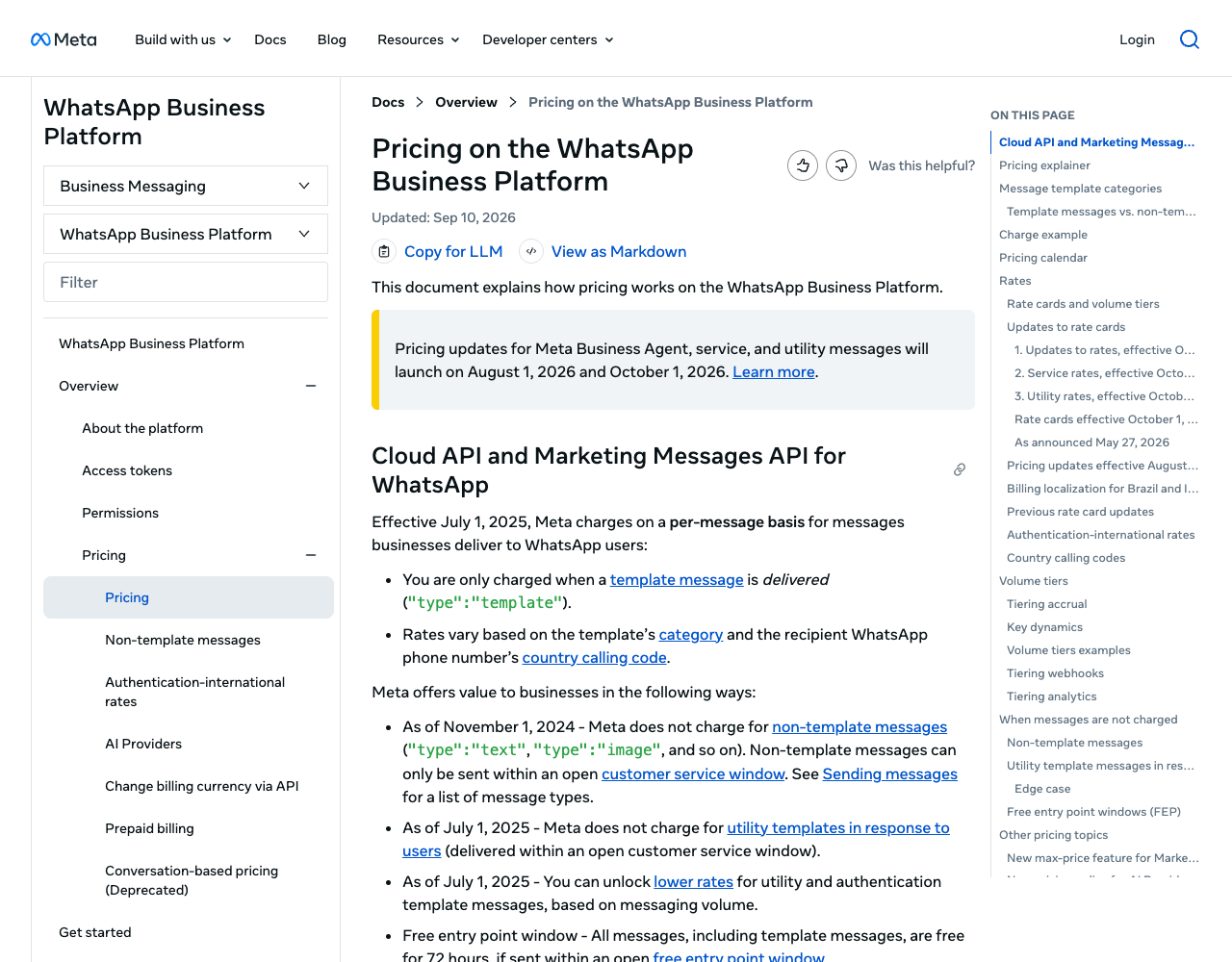
| Message | Meta charge until 30 September 2026 | From 1 October 2026 |
|---|---|---|
| Marketing template | Charged | Charged |
| Utility template, window closed | Charged | Charged |
| Utility template in an open window | Free | Charged |
| Authentication template | Charged (authentication-international rate in some countries) | Charged |
| Service message (non-template reply) | Free | First 1,000 a month per phone number free, then the market's utility and authentication rate; no volume tiers |
| Meta Business Agent message | $2.00 per 1M tokens from 1 August 2026 (Meta: about 4 to 5 cents a message) | Same |
| Marketing, utility, authentication or service message in a 72-hour free entry point window | Free | Free |
Utility and authentication get monthly volume tiers; marketing doesn't. The pricing page (updated 10 September 2026) flags the 1,000 free service messages as new: unused ones don't roll over, and the non-template page, last updated 25 August 2026, doesn't mention them yet. A WABA without a payment method gets service messages delivered only until that free tier runs out.
Meta's July 2026 rates in the three markets this site ranks, as printed in Twilio's pricing CSV and Telnyx's Meta rate file (re-read 23 September 2026, first volume tier); Meta's non-template page uses the same 0.68 cents for Brazil utility. Meta's 1 October 2026 change list leaves utility and authentication in these markets alone but raises Mexico's marketing rate:
- United States: utility and authentication $0.0034; marketing not delivered.
- Brazil: marketing $0.0625; utility and authentication $0.0068.
- Mexico: marketing $0.0305 until 30 September 2026 (the October figure is on Meta's new card); utility and authentication $0.0085.
Brazil bills in reais. Since 1 July 2026, partners and directly integrated businesses whose Sold-To country in Billing Hub is Brazil can create WABAs billed in BRL by Facebook Brasil. Meta asks them to move every WABA to BRL by 30 June 2027; from 1 July 2027 it "will no longer deliver the messages of non-BRL WABAs" of those customers (pricing page).
WhatsApp Business API webhooks
Everything arrives by webhook: the messages field carries inbound messages plus delivery and read statuses. Meta's rules (webhook guide, signature docs):
- Verification: Meta sends
hub.mode=subscribe,hub.verify_tokenandhub.challenge; check the token, echo the challenge. - Signature:
X-Hub-Signature-256: sha256=…is a SHA-256 signature of the payload made with your app secret. Check it on the raw body before parsing. - Retries: a non-200 response makes Meta retry "for up to 7 days", so store message IDs and drop duplicates.
- Limits: payloads up to 3 MB; a valid TLS certificate (self-signed ones are rejected).
- User IDs: since April 2026 webhooks carry a business-scoped
user_id, and users with the new WhatsApp usernames may arrive without a phone number (Meta). Key customer records on both.
Illustrative code, written from the official documentation and not run by the editorial team.
// Verify Meta's X-Hub-Signature-256 header (Node.js 18+).
// rawBody must be the exact bytes Meta sent, read before JSON parsing.
import crypto from "node:crypto";

export function isFromMeta(rawBody, signatureHeader, appSecret) {
  const expected =
    "sha256=" + crypto.createHmac("sha256", appSecret).update(rawBody).digest("hex");
  const a = Buffer.from(expected);
  const b = Buffer.from(signatureHeader ?? "");
  return a.length === b.length && crypto.timingSafeEqual(a, b);
}
Where integrations break: Meta's documented error codes
These come back in API responses and failed-status webhooks; wording from Meta's error code reference, checked 23 September 2026.
| Code | Meta's description (short) | What to check |
|---|---|---|
| 131047 | More than 24 hours since the recipient last replied | Free-form message after the window closed; send a template |
| 132001 | Template doesn't exist in that language or isn't approved | Name or language code mismatch, or approval still pending |
| 132015 / 132016 | Template paused for low quality / permanently disabled | The template's quality rating; revise it |
| 131042 | Error related to your payment method | The payment method in Meta Business Suite |
| 131026 | Unable to deliver, e.g. not a WhatsApp number | Fall back to SMS or email |
| 130429 | Throughput reached | Queue and slow down |
| 190 | Access token expired | Temporary tokens expire; use a system user token |
Opt-in, WhatsApp policy and AI rules
The WhatsApp Business Messaging Policy lets you message people only if they gave you their number and "you have received opt-in permission". Per Meta's opt-in guide, the opt-in must say that the person is opting in to messages from your business and name the business; it "can be general and not specifically for WhatsApp, as long as businesses comply with all local laws". Collect it online, by SMS, by phone or on paper, per category if you like. Opt-outs made "on or off WhatsApp" must be honored, and automated chats need an escalation path such as a human agent, phone, email or a support form.
AI rules changed in 2026. On 23 September 2026 the WhatsApp Business Solution Terms became the Meta Terms for WhatsApp Business Platform; section 4.7 says "AI Providers" are "strictly prohibited" from the platform when AI is the "primary (rather than incidental or ancillary)" function, "as determined by Meta in its sole discretion". The exceptions are no longer written into the terms: they point to a list of countries, which on 24 September 2026 named only Brazil. A business may still use an AI provider as its Solution Provider, but WhatsApp data can't train AI models other than one fine-tuned for that business's own use. Our AI agent on WhatsApp and SMS tutorial covers what this means for a support bot. Where Meta must legally allow AI Providers, it charges them for non-template messages; for Brazil (+55) since 11 March 2026 (AI Providers pricing). Our reading, not legal advice: a store bot that answers order questions uses AI incidentally, while a product whose main offer is a chat assistant is what the clause targets. Meta makes the call.
Official WhatsApp API vs unofficial APIs (Evolution API and similar)
In Brazil, "evolution api whatsapp" draws about 1,100 searches a month (Ahrefs, September 2026). Evolution API is an open-source REST API with two connection types, per its README. One is "based on WhatsApp Web, leveraging the Baileys library" and "may have limitations compared to official APIs". The other is the Cloud API, "the official API provided by Meta".
The Cloud API connection is the Business Platform described on this page. The WhatsApp Web connection sits outside it: no approved templates, no business verification, no Meta billing. WhatsApp's Terms of Service prohibit "bulk messaging, auto-messaging, auto-dialing" and creating accounts "through unauthorized or automated means", and WhatsApp may suspend or terminate access. For payment links, that puts the number at risk; Evolution API vs WhatsApp Cloud API covers the ban risk, the cost difference and the move to the Cloud API.
Worked scenario: an order confirmation with a payment link, then a Pix confirmation (Brazil)
A store sells to buyers in Brazil; WhatsApp carries the order confirmation, the payment link and "payment received". The payment runs on your payment provider (PSP); this site doesn't compare PSPs. The same flow over SMS and email, with US and Mexico rules, is in our text-to-pay guide.
- Opt-in at checkout (all markets). A checkbox that names the store and says updates arrive on WhatsApp. Store the time and wording.
- Create the charge (all markets). Your server asks the PSP's API for a payment link or a dynamic Pix code, with the amount in BRL, a unique order ID and an idempotency key. Build it in test mode on both sides first, keep the PSP keys and the WhatsApp token on the server, and never put card data in your app, a message or a log.
- Send a utility template (all markets). The buyer hasn't written to you, so only a template can go out. Body parameters carry the order number and total; a URL button carries the payment-link token. Variables are supported only at the end of the URL and the button title is capped at 20 characters (Twilio's docs), so put the token last. No promotions, or it becomes marketing at $0.0625 instead of $0.0068.
- Or use Meta's order details template (Brazil only). Meta's Payments API for Brazil sends an order the buyer can pay by Dynamic Pix code, payment link, Boleto or one-click offsite card payment; for Pix, the buyer copies the code into a bank app. The template must be utility or marketing, and "WhatsApp does NOT support payment reconciliations": you match payments with your PSP by
reference_id. - Confirm on your side (all markets). Wait for the PSP's webhook, check its signature, drop duplicates, then read the final status from the PSP's API. A buyer landing on your return URL is not proof of payment.
- Send "payment received" (all markets). If the buyer wrote in the last 24 hours, a free-form reply works; from 1 October 2026 it draws on the number's 1,000 free service messages, then Brazil's utility rate applies. Otherwise send another utility template. With the Payments API, also send an
order_statusmessage. - Unhappy paths. An expired link or failed payment gets one utility reminder with a fresh link, then stops. An opt-out ends the sequence.
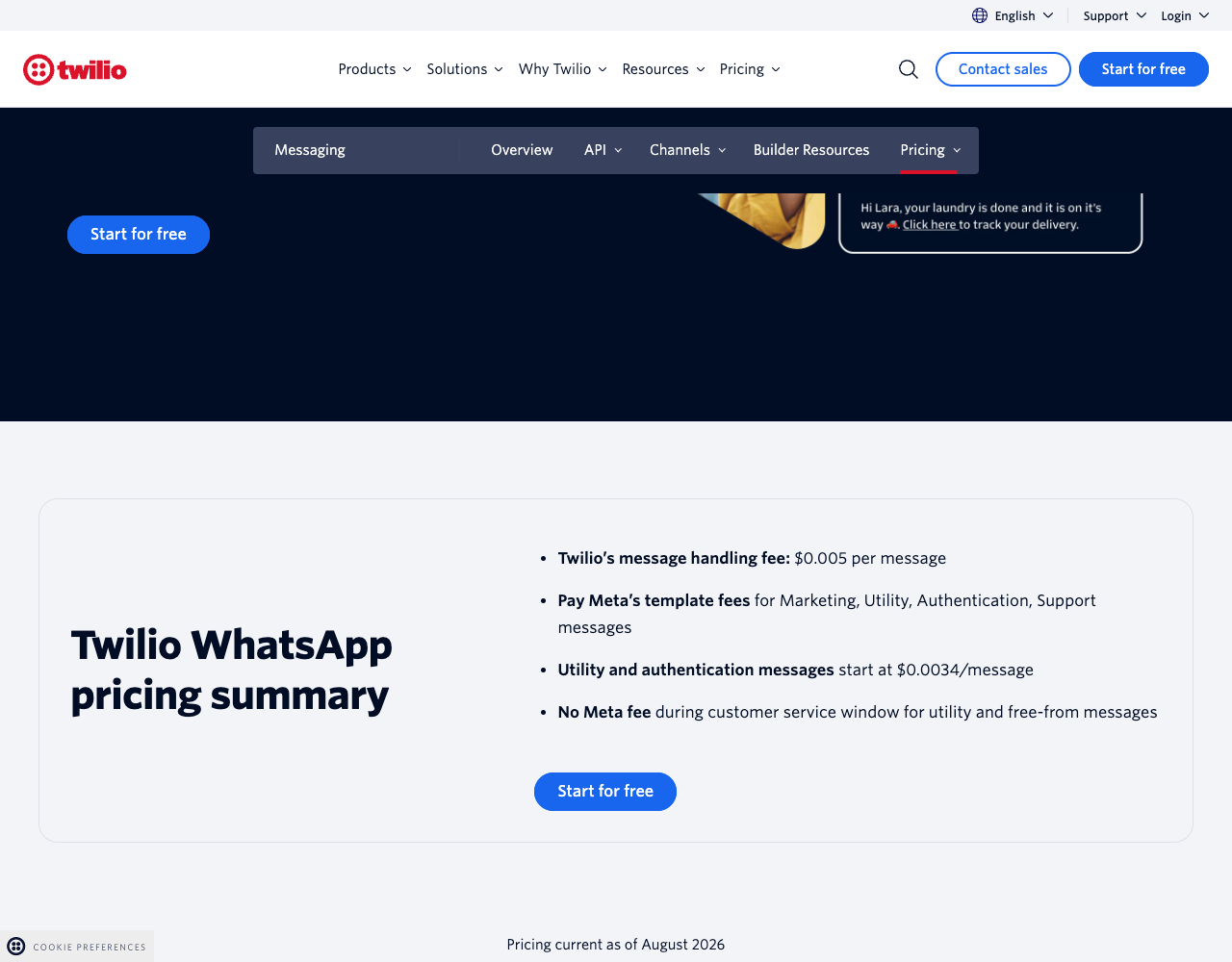
Meta's cost per paid order in Brazil from 1 October 2026, at the first-tier rates above: two utility templates (confirmation, then "payment received") = 2 × $0.0068 = $0.0136. A reminder adds $0.0068. Provider fees come on top; where they are published separately they run from $0.00219 (Vonage) to $0.005 (AWS, Twilio) per message.
Illustrative code, written from the official documentation and not run by the editorial team.
// Step 3: send an approved utility template with a URL button (Cloud API).
// Shape follows Meta's official samples; names and values are placeholders.
const res = await fetch(
  `https://graph.facebook.com/${GRAPH_VERSION}/${PHONE_NUMBER_ID}/messages`,
  {
    method: "POST",
    headers: { Authorization: `Bearer ${SYSTEM_USER_TOKEN}`, "Content-Type": "application/json" },
    body: JSON.stringify({
      messaging_product: "whatsapp",
      to: buyerPhoneDigits, // +55 number, digits only
      type: "template",
      template: {
        name: "pedido_confirmado",
        language: { code: "pt_BR" },
        components: [
          { type: "body", parameters: [
            { type: "text", text: orderId },
            { type: "text", text: totalFormatted },
          ] },
          { type: "button", sub_type: "url", index: "0", parameters: [
            { type: "text", text: paymentLinkToken },
          ] },
        ],
      },
    }),
  },
);
Every provider below documents URL buttons for payment links. For in-chat payment in Brazil, Twilio's twilio/pay sends Pix orders in a session between Brazilian numbers (BRL, digital goods only), and Sinch offers order_details as a closed beta. We found no in-chat payment docs for the US or Mexico on Meta's site: its documentation index lists Mexico payment pages, but they showed no content on 23 September 2026. Country detail: WhatsApp API providers in Brazil, Mexico and the United States.
Which providers offer WhatsApp Business API access
Six providers in our dataset document WhatsApp (alphabetical; each cell from the provider's own pages, checked 23 September 2026; Meta's fee is extra unless the row says otherwise).
| Provider | How you get access | Provider fee per utility message (US / BR / MX) | Meta's fee | In-chat payments, Brazil | Checked |
|---|---|---|---|---|---|
| AWS End User Messaging | Embedded sign-up in the AWS console | $0.005 per outbound message in all three; $0.001 inbound | Billed by AWS from Meta's INR card in USD; Brazil utility $0.0052 (CSV effective 1 July 2026) | Not documented | 23 September 2026 |
| Plivo | Through sales; USD 1,000 a month minimum (US data region) | $0.0037 / $0.0075 / $0.0094 | Included, not itemized | Not documented | 23 September 2026 |
| Sinch | Postpay account via an account manager; Embedded Signup | Not published | Meta's card applies; amounts not published | Closed beta: Pix, Boleto, payment link | 23 September 2026 |
| Telnyx | Embedded Signup; payment method required, Meta business verification "recommended for production use" | $0.004 "platform usage" (same page also says "$0 markup") | Passed through; Brazil utility $0.0068 | Not documented | 23 September 2026 |
| Twilio | Self Sign-up via Meta's pop-up; upgraded account, Meta verification before production | $0.005 inbound or outbound; $0.001 per failed message | Passed through; Brazil utility $0.0068 | Pix orders via twilio/pay, in session, digital goods | 23 September 2026 |
| Vonage | Embedded Sign-Up; WhatsApp is "Limited Availability" | $0.00219 (North America) / $0.00219 / $0.00278 (1 July and 1 October 2026 cards) | Charged on top | Not documented | 23 September 2026 |
"Meta's fee" is not one number in practice: AWS converts Meta's INR card at the 1 July 2026 exchange rate and may update it quarterly, and Plivo's bundle can't be split.
The WhatsApp Business API is the wrong tool if one person replies by hand (use the Business app), if you want to send promotions to US numbers (Meta doesn't deliver them), or if you need free, unlimited broadcasts. It fits when software sends transactional messages, OTPs or payment links to people who opted in.
Related guides
- Best WhatsApp API providers, ranked
- WhatsApp API providers for Brazil, where Pix and BRL billing matter
- WhatsApp API providers in Mexico and for US recipients
- WhatsApp Cloud API tutorial: first message, webhooks and templates
- WhatsApp Business API pricing: rates by country and provider fees
- Text to pay by SMS, WhatsApp and email: payment links, Pix and receipts
- WhatsApp business verification, step by step: documents, review times and rejections
- Vibe coding security checklist: keys, webhook signatures and MCP tokens in AI-built apps
- WhatsApp MCP servers: official servers versus unofficial WhatsApp Web bridges
- All communication API provider cards, every fact dated
- The directory's REST API and MCP server, for agents that need the same data
About this guide
The PingMyUsers editorial team wrote this guide under the rules on the methodology page; the directory is operated by Sensaria AG in Switzerland. We did not create accounts, send messages or run the code. Every fact comes from a public page in the sources list. Providers appear alphabetically; none paid for placement or reviewed the text. Report an error to contact@sensaria.ch; corrections are dated and sourced.
Methodology
On 23 September 2026 we read Meta's developer documentation on the Cloud API, pricing, templates, limits, webhooks, Brazilian payments and AI Providers, plus the WhatsApp Business Solution Terms (re-read on 24 September 2026 as the Meta Terms for WhatsApp Business Platform) and Terms of Service. Provider facts come from the directory's dataset (source link, evidence status and check date per field); we re-read the Twilio, Telnyx, AWS, Plivo and Vonage pricing pages and the two rate files that day.
Last updated
23 September 2026: first version, all facts checked that day. Meta's service-message charges start on 1 October 2026, so we re-check in October 2026, then every six months.
24 September 2026: Meta replaced the WhatsApp Business Solution Terms with the Meta Terms for WhatsApp Business Platform (23 September 2026); the AI Providers paragraph now quotes section 4.7 and the country list it points to.
Frequently asked questions
Is the WhatsApp Business API free?
No. Meta charges per delivered template by category and country, and from 1 October 2026 also for in-window utility templates and for service messages beyond 1,000 a month per phone number. Messages users send you carry no Meta charge, and inside a 72-hour free entry point window only Meta Business Agent replies are charged; providers add fees.
How do I get access to the WhatsApp Business API?
Create a Meta developer app with the WhatsApp use case, link a business portfolio and a WABA, test with Meta's number, then register yours. Or let a Business Solution Provider onboard you through Embedded Signup.
What is the difference between the WhatsApp Business app and the WhatsApp Business API?
The app is free and made for replying by hand on a phone. The API connects WhatsApp to your software, sends approved templates outside a conversation and is billed per message. Coexistence lets one number use both.
Do I need a BSP to use the WhatsApp Business API?
No. The Cloud API accepts direct integration. A BSP or Tech Provider adds onboarding help and its own API, usually for a per-message fee.
What are the requirements for the WhatsApp Business API?
A business portfolio, a WABA, a phone number you own that can take a verification call or SMS, a display name, a payment method and an HTTPS webhook. Verification is the usual way past 250 recipients a day and two numbers.
How much does the WhatsApp Business API cost per message?
It depends on category and recipient country. Per Twilio's and Telnyx's rate files (23 September 2026), Meta's utility fee is $0.0034 (US), $0.0068 (Brazil) and $0.0085 (Mexico), plus the provider's fee.
Is the WhatsApp On-Premises API still available?
No. Its last version expired on 23 October 2025, and numbers still registered on it get no messages delivered.
Can I use an unofficial WhatsApp API like Evolution API?
Its WhatsApp Web connection runs outside Meta's Business Platform. WhatsApp's Terms of Service prohibit bulk messaging and auto-messaging and let WhatsApp suspend access. Its Cloud API connection is the official route and follows the rules in this guide.
Sources
- Meta — Pricing on the WhatsApp Business Platform — checked 23 September 2026
- Meta — Pricing for non-template messages (Meta Business Agent, service and utility) — checked 23 September 2026
- Meta — Pricing policy for AI Providers — checked 23 September 2026
- Meta Terms for WhatsApp Business Platform (last modified 23 September 2026), §4.7 AI Providers — checked 24 September 2026
- Meta — About the WhatsApp Business Platform — checked 23 September 2026
- Meta — WhatsApp Business Platform overview — checked 23 September 2026
- Meta — Cloud API: get started — checked 23 September 2026
- Meta — Solution Partners, Tech Providers and Tech Partners — checked 23 September 2026
- Meta — Embedded Signup overview — checked 23 September 2026
- Meta — Onboarding WhatsApp Business app users (Coexistence) — checked 23 September 2026
- Meta — On-Premises API sunset — checked 23 September 2026
- Meta — Business phone numbers — checked 23 September 2026
- Meta — Messaging limits — checked 23 September 2026
- Meta — Cloud API throughput — checked 23 September 2026
- Meta — Official Business Accounts — checked 23 September 2026
- Meta — Template categorization — checked 23 September 2026
- Meta — Per-user marketing template message limits — checked 23 September 2026
- Meta — Send messages and the customer service window — checked 23 September 2026
- Meta — Set up webhooks (WhatsApp Cloud API) — checked 23 September 2026
- Meta — Webhooks: getting started (payload signatures) — checked 23 September 2026
- Meta — Business-scoped user IDs — checked 23 September 2026
- Meta — Get opt-in for WhatsApp — checked 23 September 2026
- WhatsApp Business Messaging Policy — checked 23 September 2026
- Meta — Payments API, Brazil — checked 23 September 2026
- Meta — Order details template message (Brazil) — checked 23 September 2026
- WhatsApp for Business — WhatsApp vs WhatsApp Business — checked 23 September 2026
- WhatsApp Terms of Service — checked 23 September 2026
- Evolution API repository (README) — checked 23 September 2026
- Meta — WhatsApp API examples (official samples) — checked 23 September 2026
- AWS End User Messaging pricing — checked 23 September 2026
- AWS End User Messaging Social — getting started with WhatsApp — checked 23 September 2026
- AWS End User Messaging Social — message templates — checked 23 September 2026
- Plivo — WhatsApp prerequisites — checked 23 September 2026
- Plivo — WhatsApp pricing (US) — checked 23 September 2026
- Plivo — WhatsApp pricing (Brazil) — checked 23 September 2026
- Plivo — WhatsApp pricing (Mexico) — checked 23 September 2026
- Sinch — Getting started with a WhatsApp channel — checked 23 September 2026
- Sinch — WhatsApp Payments: Brazil — checked 23 September 2026
- Telnyx — WhatsApp pricing — checked 23 September 2026
- Telnyx — WhatsApp Embedded Signup — checked 23 September 2026
- Telnyx — Meta pass-through rates (CSV) — checked 23 September 2026
- Twilio — WhatsApp pricing — checked 23 September 2026
- Twilio — WhatsApp pricing details (CSV) — checked 23 September 2026
- Twilio — WhatsApp Sandbox — checked 23 September 2026
- Twilio — WhatsApp Self Sign-up — checked 23 September 2026
- Twilio — twilio/pay content type — checked 23 September 2026
- Twilio — twilio/call-to-action content type (URL buttons) — checked 23 September 2026
- Vonage — WhatsApp pricing: Vonage platform fees — checked 23 September 2026
- Vonage — WhatsApp Business API guide (Messages API) — checked 23 September 2026
- Vonage — Messages API Sandbox — checked 23 September 2026
- Meta — Cloud API error codes — checked 23 September 2026