WhatsApp Cloud API tutorial: get started and send your first message (2026)
Editorial team · updated · facts checked
To use the WhatsApp Cloud API, create a Meta app with the WhatsApp use case, connect a WhatsApp Business Account, send the hello_world template from Meta's test number, replace the temporary token with a system user token, then call POST /{phone-number-id}/messages on Graph API v26.0 and receive replies on a signed HTTPS webhook.
We wrote it from Meta's developer documentation as published on 23 September 2026. Nobody on the editorial team created a Meta app, ran the code or sent a message, so every snippet is illustrative. Access routes, template categories and prices are in the WhatsApp Business API guide; this page is the build.
Before you start
- A Facebook or managed Meta account, registered as a Meta developer.
- A phone with WhatsApp for the test messages.
- A server that keeps secrets and serves HTTPS with a valid certificate; Meta rejects self-signed ones. The samples use Node.js 18+ (built-in
fetch) and Express 5.
Which Graph API version goes in the URL
On 23 September 2026 the newest version was v26.0, released 29 July 2026 (Meta's version table). Meta's own examples mix v23.0 (get started, usable until 8 October 2027), v26.0 (tokens, text messages) and v19.0 (contextual replies, expired 21 May 2026). The versioning guide lets an app use an older version only if it has already called it, so start on v26.0 and keep the version in one environment variable.
Step 1. Create a Meta app with the WhatsApp use case
In the App Dashboard, click Create App, choose Connect with customers through WhatsApp and select or create a business portfolio (Meta's get-started guide, updated 16 June 2026). Keep "WhatsApp" out of the app's name: Meta's app display-name guidelines rule out its product names, and Live mode requires that name.
Step 2. Send hello_world from the test number
Click Start using the API. In API Setup, select or create a WhatsApp Business Account (WABA); Meta generates and registers a test business number for it.
- Click Generate access token. It's a user token, which Meta's access-token page says must be regenerated "every few hours".
- Pick the test number as From, your own WhatsApp number as To, and click Send message. That sends Meta's pre-approved
hello_worldtemplate. - Copy the phone number ID and WABA ID. API calls use the ID, not the number.
- Reply from your phone. The reply opens a 24-hour customer service window for step 6.
Step 3. Create a system user and a permanent token
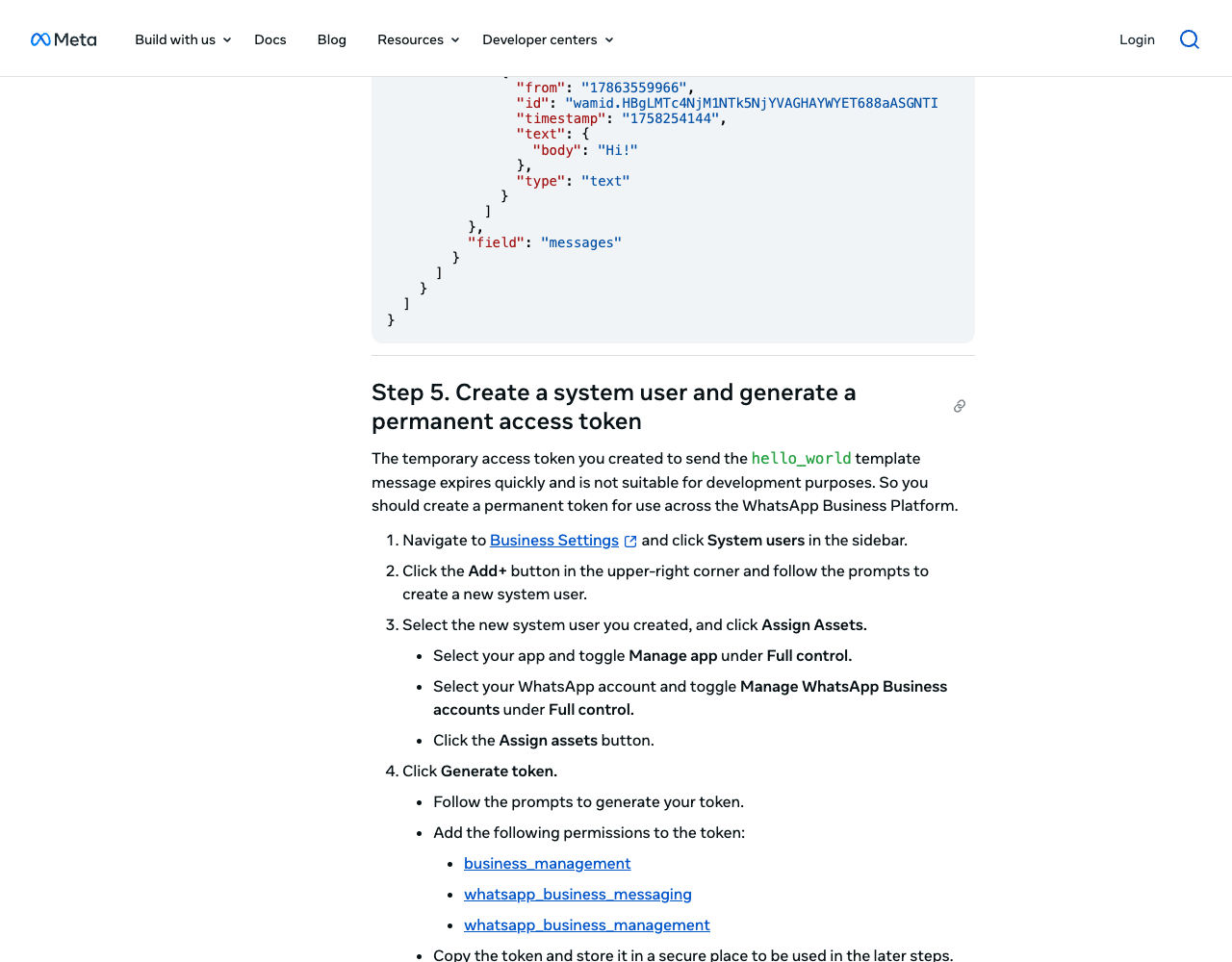
In Business Settings → System users, add a system user, assign it your app (Manage app) and your WABA with full control, and click Generate token with business_management, whatsapp_business_messaging and whatsapp_business_management; the dialog also asks for an expiration preference. Without WABA access, calls fail with Graph error code 200, which Meta says is "not to be confused with HTTP status code 200".
Illustrative code, written from the official documentation and not run by the editorial team.
# .env: server only; never in browser code, a mobile bundle or a public repo
WA_TOKEN=EAAJB...                  # system user token
WA_PHONE_NUMBER_ID=106540352242922 # from API Setup
WA_WABA_ID=102290129340398
WA_APP_SECRET=...                  # App Dashboard > Settings > Basic; signs webhooks
WA_VERIFY_TOKEN=...                # any random string you choose
GRAPH_API_VERSION=v26.0
The app secret can't be rotated by API; if it leaks, reset it in Basic settings at once.
Step 4. Send a template message with the Graph API
All sends go to POST https://graph.facebook.com/{version}/{phone-number-id}/messages. This hello_world request follows the dashboard example in Meta's 2022 token walkthrough, which used v13.0:
Illustrative code, written from the official documentation and not run by the editorial team.
curl "https://graph.facebook.com/$GRAPH_API_VERSION/$WA_PHONE_NUMBER_ID/messages" \
  -H "Authorization: Bearer $WA_TOKEN" \
  -H "Content-Type: application/json" \
  -d '{
    "messaging_product": "whatsapp",
    "recipient_type": "individual",
    "to": "+16505551234",
    "type": "template",
    "template": { "name": "hello_world", "language": { "code": "en_US" } }
  }'
In Node.js, plain fetch does the job. Meta's WhatsApp Node.js SDK is archived on GitHub (last push 7 June 2023), and its npm package is still at 0.0.5-Alpha.
Illustrative code, written from the official documentation and not run by the editorial team.
// send-template.mjs (Node.js 18+, server side)
const { WA_TOKEN, WA_PHONE_NUMBER_ID, GRAPH_API_VERSION = "v26.0" } = process.env;

export async function sendTemplate(to, name, lang, bodyParams = []) {
  const template = { name, language: { code: lang } };
  if (bodyParams.length) {
    template.components = [
      { type: "body", parameters: bodyParams.map((text) => ({ type: "text", text })) },
    ];
  }
  const res = await fetch(
    `https://graph.facebook.com/${GRAPH_API_VERSION}/${WA_PHONE_NUMBER_ID}/messages`,
    {
      method: "POST",
      headers: { Authorization: `Bearer ${WA_TOKEN}`, "Content-Type": "application/json" },
      body: JSON.stringify({ messaging_product: "whatsapp", recipient_type: "individual", to, type: "template", template }),
    },
  );
  const data = await res.json();
  if (!res.ok) throw new Error(`${data.error.code}: ${data.error.error_data?.details ?? data.error.message}`);
  return data.messages[0].id; // wamid: accepted, not yet delivered
}

await sendTemplate("+16505551234", "hello_world", "en_US");
What the quickstart leaves out, from Meta's send-message page:
- A 200 response means "accepted". Delivery arrives later as
sent,deliveredandreadstatus webhooks with the samewamid. - Keep the
+and country code. Without the plus, Meta prepends your business number's country code:1 (631) 555-1234sent from an Indian number goes to +91… Brazilian and Mexican prefixes may be rewritten, sowa_idcan differ from your input. - Order isn't guaranteed. In a sequence, wait for
deliveredbefore the next send.
Your own templates use named ({{first_name}}) or positional ({{1}}) parameters, and review "can take up to 24 hours" (template fundamentals); categories and prices are in the pillar guide. For US users, start with a utility template: WhatsApp "does not currently deliver marketing template messages" to US numbers (Meta).
Step 5. Receive messages with a webhook
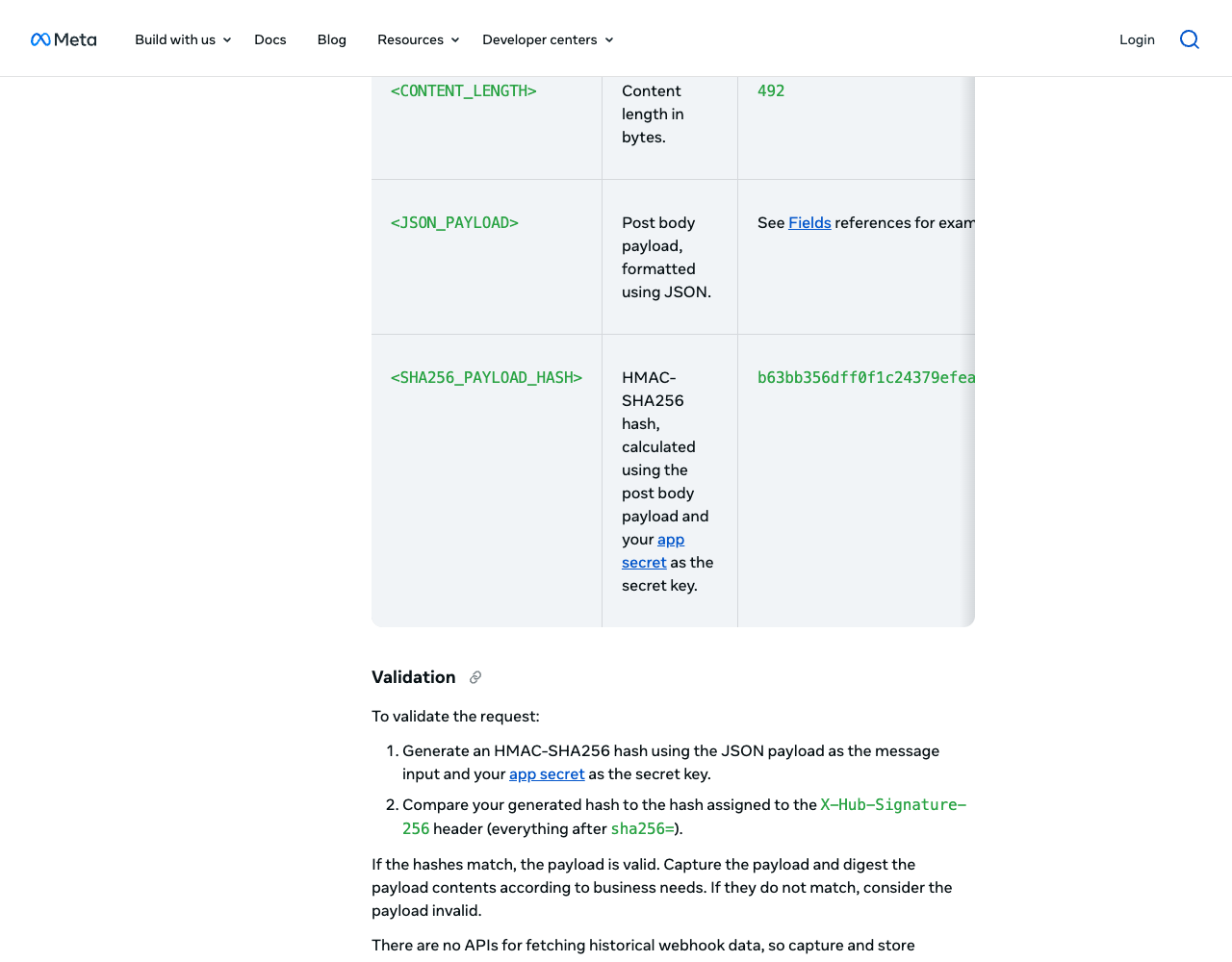
Meta checks your endpoint with a GET when you save the Callback URL, then sends each event as a POST signed with your app secret.
Illustrative code, written from the official documentation and not run by the editorial team.
// webhook.mjs (npm install express@5)
import crypto from "node:crypto";
import express from "express";
import { handleIncoming } from "./reply.mjs";

const { WA_VERIFY_TOKEN, WA_APP_SECRET } = process.env;
const app = express();
const seen = new Set(); // in production: a table with a unique key on the message id

// Verification: echo hub.challenge only when the verify token matches.
app.get("/webhooks/whatsapp", (req, res) => {
  const ok = req.query["hub.mode"] === "subscribe" && req.query["hub.verify_token"] === WA_VERIFY_TOKEN;
  if (!ok) return res.sendStatus(403);
  res.status(200).send(req.query["hub.challenge"]);
});

// Events: check X-Hub-Signature-256 on the raw bytes before parsing.
app.post("/webhooks/whatsapp", express.raw({ type: "application/json" }), (req, res) => {
  const expected = "sha256=" + crypto.createHmac("sha256", WA_APP_SECRET).update(req.body).digest("hex");
  const got = req.get("x-hub-signature-256") ?? "";
  const valid = got.length === expected.length &&
    crypto.timingSafeEqual(Buffer.from(got), Buffer.from(expected));
  if (!valid) return res.sendStatus(401);
  res.sendStatus(200); // answer fast; queue slow work

  const payload = JSON.parse(req.body.toString("utf8"));
  for (const entry of payload.entry ?? []) {
    for (const change of entry.changes ?? []) {
      if (change.field !== "messages") continue;
      const { metadata, messages = [], statuses = [] } = change.value;
      for (const msg of messages) {
        if (seen.has(msg.id)) continue; // retries repeat webhooks
        seen.add(msg.id);
        handleIncoming(metadata.phone_number_id, msg).catch(console.error);
      }
      for (const s of statuses) console.log(s.id, s.status, s.pricing?.type, s.errors?.[0]?.code);
    }
  }
});

app.listen(process.env.PORT ?? 3000);
The rules behind it, from Meta's endpoint page and webhooks overview:
- Signature: HMAC-SHA256 of the body with the app secret, compared with everything after
sha256=. Hash the raw bytes; parsed and re-serialized JSON won't match. - Retries and size: anything but a 200 makes Meta retry "for up to 7 days", so expect duplicates. (Graph API's generic webhooks page says 36 hours.) Past webhooks can't be fetched later, so store what you need. A batch holds up to 1,000 updates and a payload up to 3 MB.
- Speed: Meta's throughput page asks for a median response under 250 ms, under 1 % of requests over 1 second, and capacity for three status webhooks per message you send.
To connect it, open App Dashboard → Use cases → Customize → Configuration, enter the Callback URL and verify token, subscribe to messages and click Test (Meta also documents a test webhook app on Render). A passing Test proves little, because Meta's messages test works in Dev and Live mode alike. If real messages don't arrive, check Live mode: "some webhooks will not be sent if your app is in Dev mode." Going Live needs an app display name, contact email, Terms of Service URL and app icon in Basic settings.
Don't copy Meta's signature-validation sample (unchanged since 7 June 2023): it computes the HMAC with the verify token instead of the app secret, and its return 'INVALID SIGNATURE HASH', 403 sits outside the if, so it rejects every POST.
Step 6. Reply inside the 24-hour window
A user's message opens a 24-hour customer service window, and each new message resets it. Inside it you can send free-form service messages (text, media, buttons, lists); outside it, only templates, and a free-form send returns error 131047.
Illustrative code, written from the official documentation and not run by the editorial team.
// reply.mjs: mark the message as read, then answer in the open window
const { WA_TOKEN, GRAPH_API_VERSION = "v26.0" } = process.env;

export async function handleIncoming(phoneNumberId, msg) {
  const url = `https://graph.facebook.com/${GRAPH_API_VERSION}/${phoneNumberId}/messages`;
  const headers = { Authorization: `Bearer ${WA_TOKEN}`, "Content-Type": "application/json" };
  const post = (body) => fetch(url, { method: "POST", headers, body: JSON.stringify(body) });

  await post({ messaging_product: "whatsapp", status: "read", message_id: msg.id });

  // Users with a WhatsApp username can arrive without a phone number: use their BSUID.
  const who = msg.from ? { to: `+${msg.from}` } : { recipient: msg.from_user_id };
  const res = await post({
    messaging_product: "whatsapp",
    recipient_type: "individual",
    ...who,
    context: { message_id: msg.id }, // quotes the user's message
    type: "text",
    text: { body: "Thanks, we got your message. A person will reply within one business day." },
  });
  if (!res.ok) console.error((await res.json()).error); // 131047: window closed, send a template
}
- Identity: since April 2026 webhooks carry a business-scoped user ID (
from_user_id). Per Meta's BSUID page, a user with a username arrives without a phone number unless you've been in contact in the last 30 days or they're in your contact book; sends to a BSUID viarecipientare supported from July 2026. Store both IDs. - Cost: from 1 October 2026 Meta charges for service messages beyond a free tier of 1,000 a month per business phone number, at the market's utility rate; without a payment method it stops delivering them once the tier is used up (pricing page, updated 10 September 2026). Rates per country are in our WhatsApp API pricing breakdown. In status webhooks,
pricing.typereadsfree_customer_serviceinside the tier andregularafter it.
Step 7. Move to production
- Add your number and a display name in API Setup or WhatsApp Manager. Per Meta's rules you own it, it has a country and area code (no short codes), it can receive an SMS or voice call, and it isn't active on WhatsApp.
- Register it by API. Adding and verifying a number doesn't register it: "You can only register a number via the API." The
pinbecomes its two-step verification PIN.
Illustrative code, written from the official documentation and not run by the editorial team.
curl "https://graph.facebook.com/$GRAPH_API_VERSION/$WA_PHONE_NUMBER_ID/register" \
  -H "Authorization: Bearer $WA_TOKEN" \
  -H "Content-Type: application/json" \
  -d '{ "messaging_product": "whatsapp", "pin": "212834" }'
The registration endpoint takes 10 requests per number in 72 hours, then returns 133016 and blocks the number for 72 hours. Optional data_localization_region (e.g. BR) keeps data at rest in that country.
- Add a payment method in Billing Hub. The platform overview exempts test numbers, which also get relaxed limits; on your own number, billing problems fail template sends with 131042.
- Verify the business; documents and steps are in our WhatsApp business verification walkthrough. New portfolios reach 250 unique users per 24 hours outside open windows and register two numbers; verification is one path to 2,000 users and lifts the cap to 20 numbers (messaging limits).
- Switch the app to Live mode and put the new phone number ID in
WA_PHONE_NUMBER_ID.
Common errors and what they mean
Meta advises handling errors by the numeric code and the details field, not by titles. From Meta's error code reference, updated 18 June 2026:
| Code | Meta's description (short) | What to check |
|---|---|---|
| 190 | Access token has expired | Still on the dashboard token; switch to the system user token |
| 200–299 | Permission not granted or removed | System user's WABA access and token permissions |
| 131047 | More than 24 hours since the recipient last replied | Send a template |
| 132001 | Template doesn't exist in that language or isn't approved | Name, language code, approval |
| 132000 | Parameter count doesn't match the template | Body parameters vs the template's variables |
| 131026 | Unable to deliver message | Not on WhatsApp, old app or terms not accepted; use another channel |
| 131042 | Payment method error | Billing on the WABA |
| 130429 / 131056 | Throughput reached / too many messages to one recipient | Queue and slow down |
| 133010 | Phone number not registered | Call /register (step 7) |
Retries on your side: a number handles 80 messages per second by default, inbound and outbound combined, and above that the API returns 130429 (throughput), so back off and queue. The send pages we read describe no idempotency key: after a timeout, look for a status webhook before resending, or the user may get the message twice.
Cloud API directly or through a provider
Going direct adds no provider fee but leaves tokens, webhooks, retries and templates to you. Providers wrap the same Cloud API, usually for a per-message fee (our dataset, checked 23 September 2026):
| Provider | Test path | Worth knowing |
|---|---|---|
| 360dialog | Sandbox: no payment method, 200 messages in total to your own number, three predefined templates | Brazilian (+55) sandbox number; HTTPS webhook required |
| Twilio | WhatsApp Sandbox on a shared number | $0.005 Twilio fee per message on top of Meta's; sandbox messages billed at standard WhatsApp pricing |
| Vonage | Messages API Sandbox: 100 messages a month, allow-listed recipients | No WhatsApp templates in the sandbox; WhatsApp is "Limited Availability" |
Stay direct if you can run an HTTPS webhook and guard a token; pick a provider for SMS on the same invoice or a sandbox without a Meta app. The WhatsApp API provider rankings compare them.
Related guides
- Connect an AI agent to WhatsApp and SMS: webhooks, Meta's AI rules and human handoff
- WhatsApp Business API guide: access, templates and pricing
- WhatsApp Business API pricing in 2026 for the US, Brazil and Mexico
- WhatsApp business verification, step by step
- Best WhatsApp API providers, ranked
- Send email from Lovable with Supabase, the same server-side key pattern
- Our REST API and MCP server for AI agents
About this guide
Written by the PingMyUsers editorial team for developers adding WhatsApp to their own backend; Sensaria AG in Switzerland operates the directory. We did not create accounts, send messages or run the code. No provider paid for placement or reviewed this page. Report errors to contact@sensaria.ch with a source.
Methodology
On 23 September 2026 we read every Meta page in the sources list in a headless browser. SDK and sample status comes from GitHub and npm; provider rows come from our dataset, where each field has a source, evidence status and check date. Editorial rules: methodology page.
Last updated
23 September 2026: first version, all facts checked that day. Next checks: at publication (after Meta's 1 October 2026 pricing change), then March 2027 or at the next Graph API release.
Frequently asked questions
Is the WhatsApp Cloud API free?
No. Meta bills delivered templates by category and country and, from 1 October 2026, service replies beyond 1,000 a month per number. Test numbers need no payment method.
How do I get a permanent access token for the WhatsApp Cloud API?
Create a system user in Business Settings, assign it your app and WABA, and generate a token with the business_management, whatsapp_business_messaging and whatsapp_business_management permissions.
Which Graph API version should I use?
v26.0, the newest on 23 September 2026 (released 29 July 2026). Meta's get-started page still shows v23.0, which works until 8 October 2027.
Why am I not receiving WhatsApp webhooks?
Check that the endpoint echoed hub.challenge, that the app subscribes to messages, that it's in Live mode and that the certificate isn't self-signed.
Can I message someone who hasn't messaged me first?
Only with an approved template, and only if they opted in. Free-form messages need an open 24-hour customer service window.
Can I call the WhatsApp Cloud API from a Lovable or React front end?
No: anyone could copy the token and send messages billed to you. Call a backend function or server route that holds the token in its secrets.
Sources
- Meta — WhatsApp Cloud API Get Started (updated 16 June 2026) — checked 23 September 2026
- Meta — Graph API changelog: versions — checked 23 September 2026
- Meta — Graph API versioning guide — checked 23 September 2026
- Meta — Access tokens (updated 19 September 2026) — checked 23 September 2026
- Meta — App Dashboard basic settings (app secret, Live mode fields) — checked 23 September 2026
- Meta — About the WhatsApp Business Platform (test resources) — checked 23 September 2026
- Meta for Developers blog — Using authorization tokens for the WhatsApp Business Platform (hello_world request) — checked 23 September 2026
- Meta — Service messages and send-message requests — checked 23 September 2026
- Meta — Text messages — checked 23 September 2026
- Meta — Contextual replies — checked 23 September 2026
- Meta — Mark messages as read — checked 23 September 2026
- Meta — Template fundamentals — checked 23 September 2026
- Meta — Webhooks overview (WhatsApp) — checked 23 September 2026
- Meta — Create a webhook endpoint — checked 23 September 2026
- Meta — Create a test webhook endpoint — checked 23 September 2026
- Meta — Messages webhook reference — checked 23 September 2026
- Meta — Graph API webhooks: getting started — checked 23 September 2026
- Meta — Business-scoped user IDs (updated 24 August 2026) — checked 23 September 2026
- Meta — Pricing on the WhatsApp Business Platform (updated 10 September 2026) — checked 23 September 2026
- Meta — Business phone numbers — checked 23 September 2026
- Meta — Register a business phone number — checked 23 September 2026
- Meta — Messaging limits — checked 23 September 2026
- Meta — Throughput (updated 17 June 2026) — checked 23 September 2026
- Meta — Cloud API error codes (updated 18 June 2026) — checked 23 September 2026
- GitHub — WhatsApp/WhatsApp-Nodejs-SDK (archived) — checked 23 September 2026
- GitHub — fbsamples signature-validation sample (app.py) — checked 23 September 2026
- npm — whatsapp 0.0.5-Alpha (Meta's Node.js SDK package) — checked 23 September 2026
- npm — express 5.2.1 — checked 23 September 2026
- Meta — Per-user marketing template message limits (US numbers) — checked 23 September 2026
- 360dialog — Sandbox — checked 23 September 2026
- Twilio — WhatsApp Sandbox — checked 23 September 2026
- Twilio — WhatsApp pricing — checked 23 September 2026
- Vonage — Messages API Sandbox — checked 23 September 2026
- Vonage — WhatsApp guide (Messages API) — checked 23 September 2026