Transactional email: what it is and how to set it up for your app (2026)
Editorial team · updated · facts checked
Transactional email is a message your app sends to one person because of something they did or need to know about their account: a password reset, a receipt, a sign-in link. To set it up, choose an email API or SMTP provider, authenticate your domain with SPF, DKIM and DMARC, send from your backend, and handle bounce and complaint webhooks.
We checked every page cited here on 23 September 2026, from FTC and Gmail rules to provider pricing, and quote prices as printed that day. The editorial team did not create provider accounts or send test messages.
What is transactional email?
A transactional email is triggered by an event in your product and goes to one recipient: the person who caused the event or whose account it concerns. It carries information that person needs, not an offer. The CAN-SPAM Act calls these "transactional or relationship" messages, and the FTC's compliance guide says a message qualifies only when its content does one of five things:
- Facilitates, completes or confirms a commercial transaction the recipient already agreed to.
- Gives warranty, recall, safety or security information about something the recipient bought.
- Reports a change in the terms, features or the recipient's standing in a membership, subscription, account or loan, or gives regular account balance information.
- Provides information about an employment relationship or employee benefits.
- Delivers goods or services the recipient already agreed to receive.
The statute is 15 U.S.C. § 7702(17). The FTC adds that "the law views these categories narrowly": a customer relationship alone does not make a message transactional.
Transactional email examples
- account security: email verification, password reset, magic sign-in link, one-time code, new-device alert;
- orders and billing: order confirmation, receipt, invoice, failed-payment notice, refund confirmation;
- account changes: plan change, terms update, renewal notice, usage or quota alert;
- delivery of the product itself: an exported file, a requested report, a shipping notice.
How transactional email works
Your backend reacts to an event, renders a message and hands it to an email provider over an HTTPS API or SMTP. The provider signs it with your domain's DKIM key and delivers it to the recipient's mailbox provider, which checks authentication and reputation before choosing inbox, spam or rejection. Outcomes (delivered, bounced, marked as spam) come back through webhooks.
Transactional vs marketing email: where the legal line sits
A message's primary purpose, not its label, decides its category. Under the FTC's guide, a message that mixes content is commercial if the subject line would lead a recipient to expect an advertisement, or if the transactional part "does not appear mainly at the beginning of the message". A commercial message must follow all of CAN-SPAM, including the opt-out, and the guide puts the penalty at up to $53,088 for each email in violation.
Regulators elsewhere draw similar lines. The UK's ICO calls these service messages and treats a message as direct marketing if it contains marketing elements "even if that is not the main purpose"; general branding and logos do not count. In the EU, the European Commission lists performance of a contract as a legal ground for processing the data a sale needs, and says direct-marketing email must also follow the ePrivacy Directive (2002/58/EC).
Mailbox providers apply the recipient's view. Google's email sender guidelines say not to include promotions in sales receipts, and its FAQ says recipients, not Google, determine the nature of the messages they receive. Yahoo's sender best practices advise against sending marketing mail from the IPs used for transactional mail, since each IP and DKIM domain has its own reputation. For developers that means two rules: no offers in receipts, resets or alerts, and a separate stream for marketing. This section summarizes regulator guidance for builders; it is not legal advice, and rules differ by country.
How to set up transactional email for your app
DNS work comes before code:
- Pick a provider and an interface: an HTTP email API for code you write, SMTP for tools that only accept SMTP credentials, such as Supabase Auth.
- Choose a sending subdomain, such as
notify.example.com, with its own DKIM key. Yahoo notes that each IP and DKIM domain has its own reputation. - Publish SPF, DKIM and DMARC from the values your provider gives you. Start DMARC at
p=nonewith aruareporting address, which Yahoo strongly recommends during setup. - Leave test mode. Amazon SES starts accounts in a sandbox per AWS Region, and Postmark reviews each new account by hand; until then both limit who you can send to.
- Send from the backend, with the API key in server-side environment variables and an idempotency key where the provider supports one.
- Receive webhooks for delivery, bounce and complaint events, and verify their signatures.
- Suppress addresses that hard-bounce or complain; stop retrying permanent failures.
- Ramp volume slowly, starting with engaged recipients, and watch the spam rate, as Google advises.
Where transactional email setups break
Each row is a documented failure and its fix:
| Symptom | Documented cause | Fix |
|---|---|---|
SPF result permerror | More than 10 DNS-querying terms, or more than one SPF record (RFC 7208) | Merge into one record and drop unused include: terms |
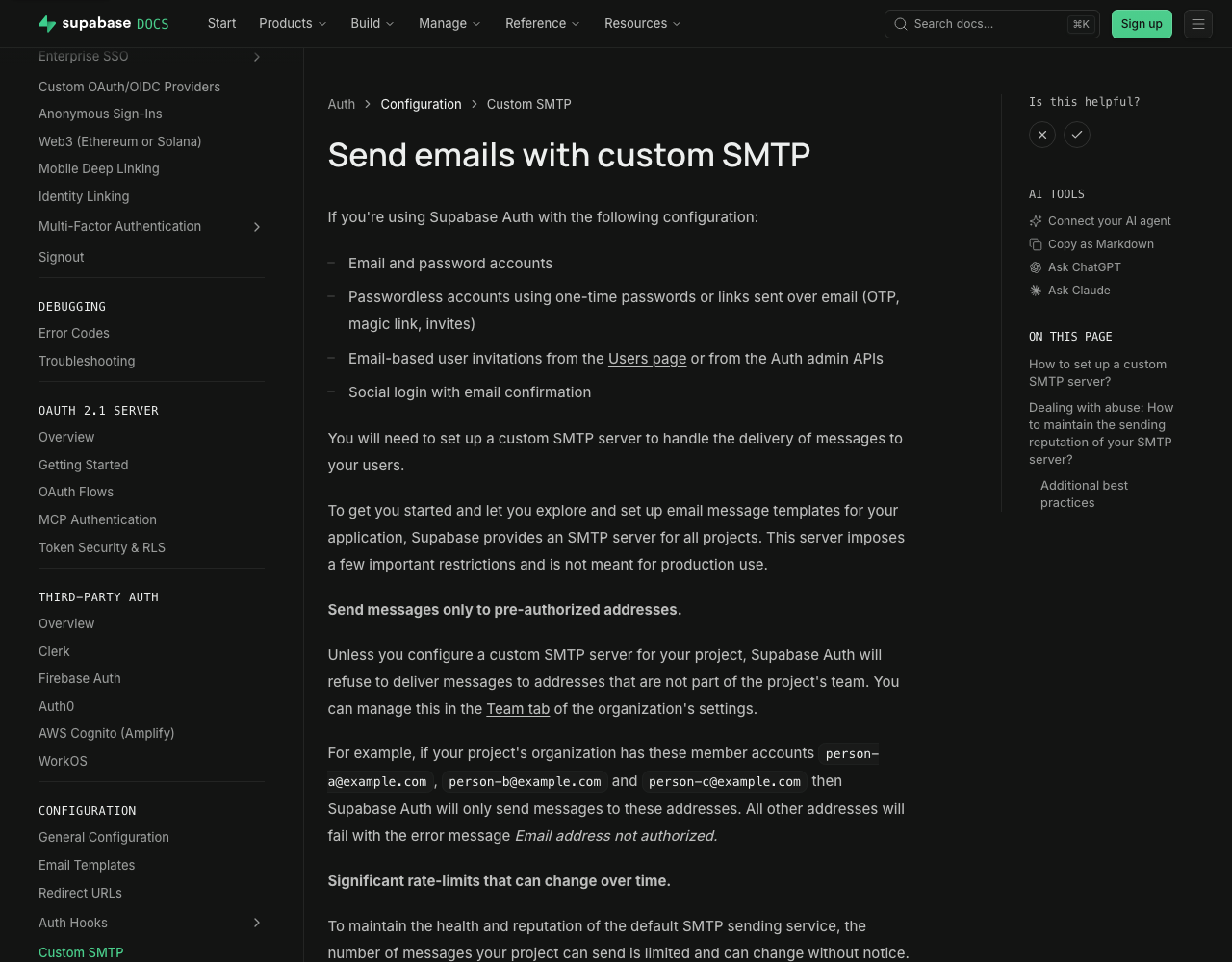
| Supabase Auth: "Email address not authorized", or mail stops after two an hour | Default SMTP delivers only to the project team, currently 2 messages per hour (Supabase) | Custom SMTP (starts at 30 an hour, adjustable) or the Send Email Auth Hook |
| SES mail reaches only your own addresses | Sandbox: verified recipients only, 200 messages per 24 hours, 1 per second (AWS) | Request production access; AWS answers within 24 hours |
| Mailgun mail reaches only test addresses | Sandbox domains send only to authorized recipients, up to 5 (Mailgun) | Add and verify your own sending domain |
| Postmark sends only to your own domains | Account not yet approved; review takes under 24 hours on weekdays (Postmark) | Request approval in the account |
Outlook.com bounce 550 5.7.515 Access denied | High-volume domain without passing SPF, DKIM and DMARC (Microsoft) | Publish all three, aligned with From |
| Resend API returns 429 | Rate limit of 10 requests per second per team, or the free plan's daily quota (Resend) | Queue sends; batch up to 100 emails per call |
| Valid webhooks fail signature checks | Body parsed and re-serialized before verification (Resend) | Verify against the raw request body |
SPF, DKIM and DMARC for transactional email
All three are DNS records that let a receiver check that mail using your domain was sent with your permission. Gmail requires SPF or DKIM from every sender and all three from bulk senders.
SPF (RFC 7208) is a TXT record listing the servers allowed to send for a domain, checked against the envelope sender (MAIL FROM, also called return-path), not the From address people see. Two rules break setups: a domain must not publish more than one SPF record, and evaluation may use at most 10 DNS-querying terms (include, a, mx, ptr, exists, redirect). Past 10, the result is permerror, and every provider you add with include: spends part of that budget.
DKIM (RFC 6376) adds a cryptographic signature to each message; receivers fetch the public key from DNS under a selector. The provider generates the key and gives you the record. Amazon SES signs with a 2048-bit key by default once Easy DKIM is set up.
DMARC ties both to the visible From domain. A message passes when SPF or DKIM passes for a domain aligned with From, and your record tells receivers what to do when neither does: p=none (monitor), p=quarantine or p=reject. Providers such as Amazon SES use their own return-path domain by default, so alignment usually comes from DKIM; SES documents a custom MAIL FROM domain (an SPF and an MX record on your subdomain) if you want SPF to align too.
DMARC changed in 2026. RFC 9989, published in May 2026, obsoletes RFC 7489 and puts DMARC on the IETF Standards Track, with reporting moved to RFC 9990 and RFC 9991. For record writers: the pct tag is removed (a new t tag covers part of its job), an np tag sets policy for non-existent subdomains, and receivers find the organizational domain by a "DNS Tree Walk" instead of a public suffix list. The version tag stays v=DMARC1. Strict alignment and explicit records for every From domain avoid differences between old and new receivers, the RFC notes.
Gmail, Yahoo and Outlook sender requirements
Gmail, Yahoo and Outlook.com each set stricter rules for high-volume senders, and transactional mail counts toward their thresholds.
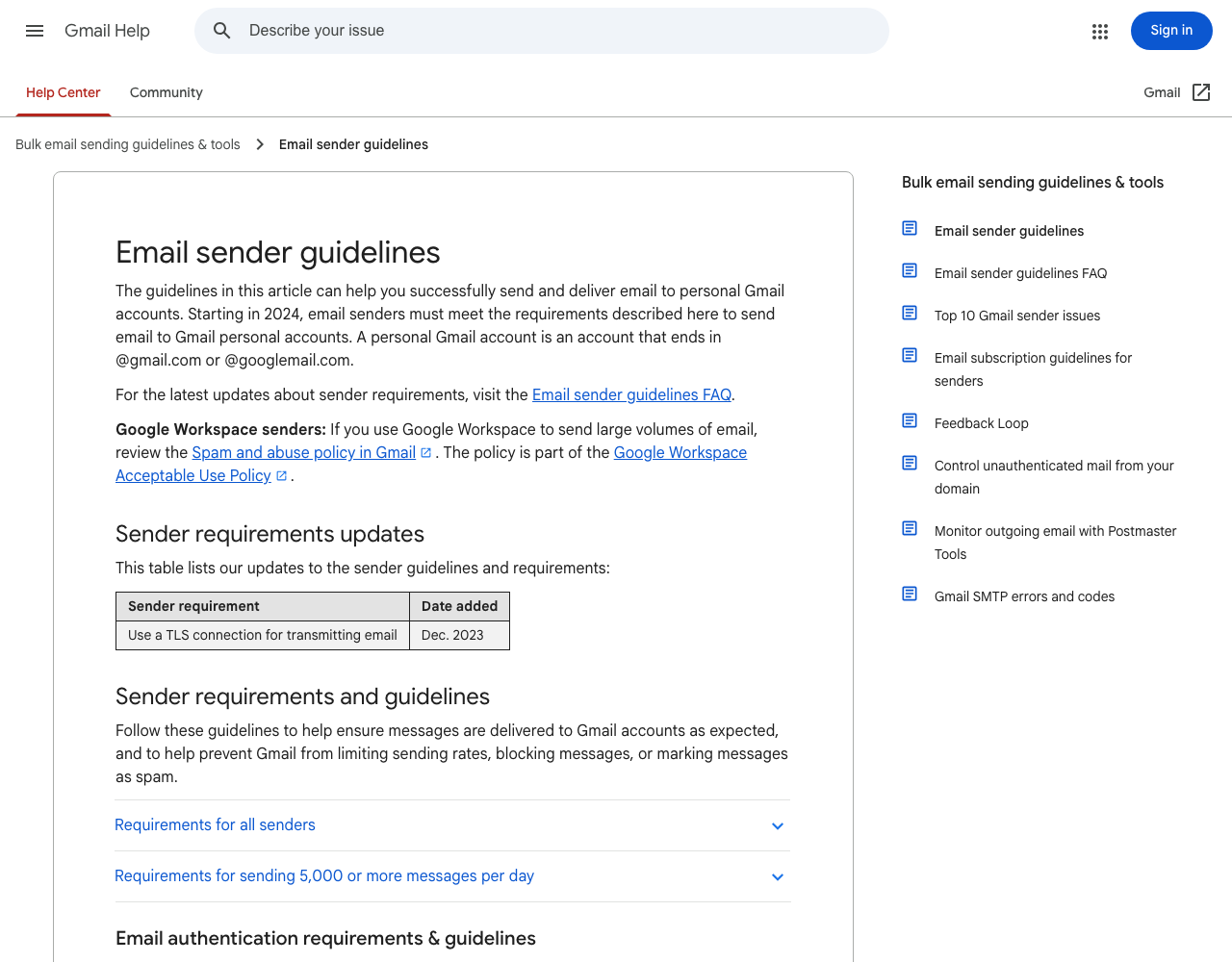
| Requirement (checked 23 September 2026) | Gmail | Yahoo | Outlook.com (Hotmail, Live) |
|---|---|---|---|
| Who the stricter tier covers | Close to 5,000 or more messages in 24 hours to personal Gmail accounts, counted across the same primary domain; bulk status never expires | "Bulk" senders; Yahoo says it will not specify a volume threshold | 5,000 or more messages to Microsoft consumer services from the same 5322.From domain |
| Authentication, every sender | SPF or DKIM; valid forward and reverse DNS; TLS | SPF or DKIM; valid forward and reverse DNS | Enforcement targets high-volume senders first; the same practices are recommended for all |
| Authentication, stricter tier | SPF and DKIM; DMARC at p=none or stricter; From aligned with SPF or DKIM | SPF and DKIM; DMARC at p=none or stricter and passing; relaxed alignment accepted | SPF and DKIM must pass; DMARC at p=none or stricter, aligned with SPF or DKIM |
| Spam complaint rate | Below 0.3% in Postmaster Tools; the FAQ advises staying below 0.1% | Below 0.3% | No number published |
| One-click unsubscribe | Marketing and subscribed messages only; transactional messages excluded | Promotional and marketing messages only; transactional excluded | Not required; a visible unsubscribe link is recommended, particularly for marketing or bulk mail |
| What failure looks like | Temporary or permanent failure codes, or spam folder; enforcement stepped up from November 2025 | Deferral of mail from domains with high complaint rates | Rejection with 550 5.7.515 Access denied |
Sources: Gmail sender guidelines and FAQ, Yahoo requirements and FAQ, Microsoft's announcement and 550 5.7.515 support page.
Google counts all mail from one primary domain toward the 5,000, so marketing and transactional subdomains add up. Gmail also passes no complaint data to Amazon SES, per the SES suppression list docs; watch that rate in Postmaster Tools.
Email API vs SMTP relay for transactional email
An email API takes one HTTPS request per message with a JSON body (from, to, subject, HTML and text parts). With SMTP, your code or tool logs in to the provider's relay and hands over a formatted message. Ports, retries, duplicate sends and serverless limits are compared in email API vs SMTP relay.
Use the API when you write the sending code: any runtime that can make an HTTPS request can call it, serverless and edge functions included, and it adds idempotency keys, stored templates and scheduled sends. Use SMTP when the sending software only speaks SMTP: auth services, CMS plugins, older frameworks.
Idempotency matters most for receipts: a retry after a timeout should not send a second one. Resend's docs accept an Idempotency-Key header (up to 256 characters, kept 24 hours) and a Resend-Idempotency-Key header over SMTP. Telnyx's Email API accepts an Idempotency-Key header with a 24-hour window, per our Telnyx provider card. Amazon SES's SendEmail and Mailgun's messages endpoint document none, and Postmark's and SendGrid's send APIs list none either; there, record a "sent" marker keyed on the order or event ID before calling. The idempotency key entry lists which providers accept one. For Python code with retries and a key, see sending email with Python via an API.
Transactional email providers compared
The table covers the five providers AI search engines named when researching this topic (Amazon SES, Mailgun, Postmark, Resend, SendGrid) plus Telnyx, the other transactional email provider in our catalog. Rows are alphabetical; the scored list is in our transactional email API rankings.
| Provider | Free option | Entry paid option | SMTP relay | Webhook authenticity | MCP server |
|---|---|---|---|---|---|
| Amazon SES | AWS Free Tier credits (up to $200 for new AWS customers, across eligible services); sandbox until production access | Essentials plan: $0.16 per 1,000 emails, no monthly fee; à la carte: $0.10 per 1,000 | Yes | Events go to Amazon SNS or Firehose; SNS messages carry a signature to verify | No SES-specific official server; the general AWS MCP Server (remote) can call SES, and an SES sample server is for non-production use |
| Mailgun | $0, 100 emails a day | Basic from $15/mo with 10,000 emails; extra $1.80 per 1,000 | Yes | HMAC-SHA256 with a webhook signing key | Vendor repository, local (stdio) only; no hosted version |
| Postmark | Developer tier: 100 emails a month, does not expire | Basic $15.00/mo with 10,000 emails; extra $1.80 per 1,000 | Yes | No HMAC signatures; docs recommend HTTP Basic auth plus IP allowlisting | Official server in ActiveCampaign's GitHub org, run locally with npx |
| Resend | 3,000 emails a month, 100 a day | Pro $20/mo with 50,000 emails; extra $0.90 per 1,000 | Yes | Signed: HMAC-SHA256 via Svix (svix-id, svix-timestamp, svix-signature) | Remote server with OAuth sign-in, plus a local server |
| SendGrid (Twilio) | 60-day trial, 100 emails a day | Essentials 50k: $19.95/mo | Yes | Signed Event Webhook (ECDSA), opt-in per webhook; no replay window documented | Twilio's docs-search server (read-only, Public Beta); Registry entries are community-built |
| Telnyx | No free monthly quota; $5 account trial credit; sandbox sends | Beta rates: $0.30 per 1,000 up to 10,000 a month, whole volume billed at its tier rate | No SMTP page in the docs | Ed25519 signature with timestamp; 5-minute replay window | Official remote and local servers |
All cells checked on 23 September 2026 on the linked vendor pages and those under Sources; USD, monthly billing. Telnyx marks its Email API as beta ("rates lock through GA"). Every fact with its source is on the provider cards for Amazon SES, Mailgun, Postmark, Resend, SendGrid and Telnyx; Twilio, SendGrid's parent, has a separate card for SMS, OTP and WhatsApp.
At about 10,000 emails a month, list prices come to $1.60 on SES Essentials, the plan new SES accounts start on ($1.00 à la carte), $3.00 on Telnyx beta rates, $15 on Mailgun Basic or Postmark Basic, $19.95 on SendGrid Essentials 50k and $20 on Resend Pro, since Resend's free tier stops at 3,000 a month. Two cells rule a provider out for some apps: Telnyx lists no SMTP relay, and Postmark does not sign webhooks.
Two vendor pages contradict themselves; the table uses the dated wording. The SES FAQ still offers "up to 3,000 message charges for free each month for the first 12 months" next to the credit-based Free Tier that began on 15 July 2025. SendGrid's pricing page lists a 60-day trial, yet its FAQ still mentions 100 emails a day "on our free SMTP plan" with no end date. Confirm with the vendor.
The transactional email rankings also score developer and AI readiness and reputation, and the same score orders our SendGrid alternatives and Amazon SES alternatives; weights are on our methodology page.
Bounce and complaint webhooks
Webhooks report what happened after the provider accepted a message. Telnyx's Email docs list email.delivered, email.bounced and email.complained among their events; Amazon SES sends the same information to SNS or Firehose, and its notification docs require at least one method of receiving bounces and complaints.
A webhook endpoint is a public URL, so verify each request:
- Resend: signing secret per endpoint, checked with the SDK or Svix libraries. The docs warn to use the raw request body; re-serialized JSON breaks the signature.
- SendGrid: the Signed Event Webhook is opt-in and uses an ECDSA key pair; verify with the public key.
- Mailgun: HMAC-SHA256 over timestamp plus token with your webhook signing key; caching tokens blocks replays.
- Amazon SES: verify the SNS message signature.
- Telnyx: Ed25519 signature over timestamp and body; reject timestamps more than 5 minutes off.
- Postmark: no signature; the webhooks overview recommends HTTP Basic auth plus Postmark's IP ranges.
Providers retry, so an event can arrive twice; Postmark suggests checking each MessageID against your database first. Return 2xx fast and queue slow work.
Suppression follows from those events: after a hard bounce (the address does not exist) or a complaint, stop sending to that address. SES keeps an account-level suppression list for bounces and complaints by default on accounts that started after 25 November 2019; among bounces, only hard bounces are added. Keep your own suppression table too; it survives a provider change.
Worked scenario: receipts and password resets from a Next.js and Supabase app
Assume a SaaS app on Next.js with Supabase Auth and card payments. It sends about 10,000 transactional emails a month: sign-up confirmations and password resets from Supabase Auth, and receipts from a Next.js route handler triggered by the payment provider's webhook.
1. Replace the built-in auth mailer. Supabase says its default server "is not meant for production use" (see the Supabase rows in the table above). Configure custom SMTP, or the Send Email Auth Hook for a provider you call over HTTP.
2. Set up DNS. Send from notify.example.com. The provider supplies the DKIM record and, with a custom return-path, SPF and MX records for a bounce subdomain. DMARC goes on the organizational domain:
; Illustrative records. Take exact names and values from your provider's dashboard.
selector1._domainkey.notify.example.com.  CNAME  selector1.dkim.provider.example.
bounce.notify.example.com.                TXT    "v=spf1 include:spf.provider.example ~all"
bounce.notify.example.com.                MX     10 feedback.provider.example.
_dmarc.example.com.                       TXT    "v=DMARC1; p=none; rua=mailto:dmarc@example.com"
3. Pick the provider by volume and interface. At 10,000 emails a month, list prices run from $1.60 to $20. This app needs SMTP for Supabase Auth (or the hook) and an API with idempotency keys for receipts; one provider covering both means one domain setup.
4. Send receipts idempotently, using the payment ID as the key so a retried payment webhook cannot send two receipts (our React Email and Next.js tutorial builds the template and the route handler in full):
Illustrative code, written from the official documentation and not run by the editorial team.
// app/api/payments/webhook/route.ts: illustrative, provider-neutral sketch
export async function POST(req: Request) {
  const raw = await req.text();
  const event = await verifyPaymentEvent(raw, req.headers); // your payment provider's SDK
  if (event.type !== "charge.succeeded") return new Response(null, { status: 200 });

  if (await isSuppressed(event.customerEmail)) return new Response(null, { status: 200 });

  const res = await fetch(process.env.EMAIL_API_URL!, {
    method: "POST",
    headers: {
      Authorization: `Bearer ${process.env.EMAIL_API_KEY}`,
      "Content-Type": "application/json",
      "Idempotency-Key": `receipt/${event.paymentId}`, // header name per your provider's docs
    },
    body: JSON.stringify({
      from: "Example Receipts <receipts@notify.example.com>",
      to: [event.customerEmail],
      subject: `Your receipt for order ${event.orderNumber}`,
      html: renderReceipt(event),
    }),
  });
  // Non-2xx makes the payment provider retry; the idempotency key prevents a duplicate.
  return new Response(null, { status: res.ok ? 200 : 502 });
}
5. Close the loop. A second route receives the email provider's events, verifies the signature on the raw body, writes hard bounces and complaints to a suppressed_emails table (read by isSuppressed) and returns 200.
6. Watch the first weeks. Register the domain in Google Postmaster Tools and read DMARC aggregate reports. Once they show only your provider and your own systems sending as your domain, move to p=quarantine, then p=reject: Microsoft advises moving gradually through those steps.
Setting up transactional email with an AI agent or MCP server
Coding agents can set up an email provider through a Model Context Protocol (MCP) server. As of 23 September 2026:
- Resend: a hosted remote MCP server at
mcp.resend.com/mcpwith OAuth sign-in, plus a documented local server. - Postmark: postmark-mcp, in ActiveCampaign's GitHub organization, is the official server (24 tools, run locally with npx).
- Mailgun: mailgun-mcp-server in its GitHub organization, local over stdio, with no hosted version.
- Amazon SES: no SES-specific official server; the general AWS MCP Server (remote, OAuth or SigV4) reaches SES through a script tool, and the SESv2 MCP Server is a sample for non-production use.
- Telnyx: a remote server at
api.telnyx.com/v2/mcpthat takes an API key or an OAuth sign-in (a Telnyx Portal grant, used by Claude custom connectors), plus a local package; Telnyx describes its genericinvoke_api_endpointtool as destructive-capable. - SendGrid: Twilio's MCP server is read-only docs search (Public Beta) that indexes SendGrid docs; it "does not execute API calls". SendGrid entries in the official MCP Registry come from community publishers.
An agent with a full-access key can send mail as your domain; give it its own narrowly scoped key and revoke it after setup. Each provider card records MCP status and agent skills with sources, and the directory's read-only API and MCP server returns the same data to an agent comparing providers.
Related guides
- Email MCP servers compared: which email APIs an AI agent can drive, and with what permissions
- Free email API and SMTP relay tiers compared: monthly and daily caps, card rules, catches
- Best transactional email services, scored with published weights
- All communication API rankings
- OTP and verification API rankings, for sign-in codes by SMS or email
- SMS API rankings
- WhatsApp Business API providers, ranked
- WhatsApp Business API guide: access, pricing and setup
- Fix the Supabase "email rate limit exceeded" error
- Send email from Next.js with React Email templates
- Payment links and receipts by email, SMS and WhatsApp
- Email API vs SMTP relay: which one your app should use
- Send email from a Lovable app with Supabase: Lovable Emails, connectors or an Edge Function
- Browse every provider card in the catalog
About this guide
The PingMyUsers editorial team wrote this guide for developers adding email to an app; Sensaria AG in Switzerland operates the directory. Providers do not pay for placement, and none reviewed this page. Provider facts link to the vendor's own page and match the checked data files behind our six provider cards. To report an error, email contact@sensaria.ch with the page and the source that shows the correct fact.
Methodology
On 23 September 2026 we checked each source listed on this page: FTC and ICO guidance, Google, Yahoo and Microsoft requirements, IETF RFCs, and each provider's pricing, webhook and MCP pages. Prices are as printed, in USD, monthly billing. Where a page was silent, the claim is left out. We did not create accounts, send messages or measure inbox placement, so this guide makes no deliverability claims about any provider.
Section order follows the 202 definition and setup searches that GPT and Gemini ran for 10 phrasings of this question (5 runs each). How we score providers is on the methodology page.
Last updated
23 September 2026: first version, all facts checked that day. Next scheduled re-check: March 2027, or sooner if a price or a mailbox provider's rules change.
Frequently asked questions
What is a transactional email?
A message sent to one person because of an action or account event: a password reset, receipt, order confirmation, sign-in link or security alert. Under CAN-SPAM it counts as "transactional or relationship" only when its primary purpose fits one of five FTC categories, such as confirming a transaction the recipient agreed to.
What is the difference between transactional and marketing email?
Purpose. A transactional email informs the recipient about a transaction or account; a marketing email promotes something. If the subject line reads as an ad, or the transactional content does not come first, the FTC treats the message as commercial, needing an opt-out.
Do transactional emails need an unsubscribe link?
Gmail's and Yahoo's one-click unsubscribe rule covers only marketing and promotional messages. CAN-SPAM exempts purely transactional messages from most of its rules but still forbids misleading routing information.
Is a password reset email transactional?
Yes. Google's and Yahoo's sender FAQs both name password resets as transactional messages.
Do I need SPF, DKIM and DMARC for transactional email?
Gmail requires SPF or DKIM from every sender, and all three (DMARC at least p=none) from senders of about 5,000 messages a day to personal Gmail accounts. Yahoo and Outlook.com have similar bulk rules; set up all three from the start.
Should I use an email API or SMTP for transactional email?
An API when you write the sending code; it works from serverless functions and supports idempotency keys. SMTP when a tool only accepts SMTP credentials, such as Supabase Auth.
Can I send transactional email with Supabase's built-in email service?
Only for testing. Supabase's default SMTP server delivers only to project team addresses, currently at 2 messages per hour. Configure custom SMTP or the Send Email Auth Hook before launch; if you already see the error, follow the steps in fixing the Supabase email rate limit error.
Sources
- FTC — CAN-SPAM Act: A Compliance Guide for Business — checked 23 September 2026
- 15 U.S. Code § 7702 — Definitions (transactional or relationship message) — checked 23 September 2026
- European Commission — Legal grounds for processing data — checked 23 September 2026
- European Commission — Can data received from a third party be used for marketing? — checked 23 September 2026
- ICO — Identify direct marketing (service messages) — checked 23 September 2026
- Google — Email sender guidelines — checked 23 September 2026
- Google — Email sender guidelines FAQ — checked 23 September 2026
- Yahoo Sender Hub — Best practices and sender requirements — checked 23 September 2026
- Yahoo Sender Hub — FAQs — checked 23 September 2026
- Microsoft — Outlook's new requirements for high-volume senders — checked 23 September 2026
- Microsoft Support — Fix NDR error 550 5.7.515 in Outlook.com — checked 23 September 2026
- RFC 7208 — Sender Policy Framework (SPF) — checked 23 September 2026
- RFC 6376 — DomainKeys Identified Mail (DKIM) Signatures — checked 23 September 2026
- RFC 9989 — Domain-Based Message Authentication, Reporting, and Conformance (DMARC) — checked 23 September 2026
- RFC 8058 — Signaling One-Click Functionality for List Email Headers — checked 23 September 2026
- Amazon SES — pricing — checked 23 September 2026
- Amazon SES — FAQs (free tier wording) — checked 23 September 2026
- Amazon SES — Request production access (sandbox) — checked 23 September 2026
- Amazon SES — Using the SMTP interface — checked 23 September 2026
- Amazon SES — Easy DKIM — checked 23 September 2026
- Amazon SES — Custom MAIL FROM domain — checked 23 September 2026
- Amazon SES — Setting up event notifications — checked 23 September 2026
- Amazon SES — Account-level suppression list — checked 23 September 2026
- Amazon SNS — Verifying the signatures of Amazon SNS messages — checked 23 September 2026
- AWS — Setting up the AWS MCP Server (Agent Toolkit for AWS) — checked 23 September 2026
- AWS Messaging Blog — AI agents and the Model Context Protocol with Amazon SES — checked 23 September 2026
- Mailgun — pricing — checked 23 September 2026
- Mailgun — Sandbox domains — checked 23 September 2026
- Mailgun — Securing webhooks — checked 23 September 2026
- Mailgun — mailgun-mcp-server (GitHub) — checked 23 September 2026
- Postmark — pricing — checked 23 September 2026
- Postmark — Webhooks overview — checked 23 September 2026
- ActiveCampaign — postmark-mcp (GitHub) — checked 23 September 2026
- Resend — pricing — checked 23 September 2026
- Resend — Verify webhook requests — checked 23 September 2026
- Resend — Idempotency keys — checked 23 September 2026
- Resend — MCP server — checked 23 September 2026
- Twilio SendGrid — Email API pricing — checked 23 September 2026
- Twilio SendGrid — 60-day free trial plans — checked 23 September 2026
- Twilio SendGrid — Event Webhook security features — checked 23 September 2026
- Official MCP Registry — search results for sendgrid — checked 23 September 2026
- Twilio — Twilio MCP server (docs search, Public Beta) — checked 23 September 2026
- Telnyx — Email API pricing (beta) — checked 23 September 2026
- Telnyx — Email API overview — checked 23 September 2026
- Telnyx — Email webhooks and events — checked 23 September 2026
- Telnyx — Remote MCP — checked 23 September 2026
- Supabase — Send emails with custom SMTP — checked 23 September 2026
- Postmark — How does the account approval process work? — checked 23 September 2026
- Resend — Account quotas and limits — checked 23 September 2026