How to send email from Next.js with React Email (2026)
Editorial team · updated · facts checked
To send email from Next.js with React Email, install the react-email package, write each email as a React component, call await render() on the server to get HTML and toPlainText() for the text part, then pass both strings to your provider's SDK from a Server Action or Route Handler that reads the API key from a server-only environment variable.
React Email is an open-source MIT library maintained by Resend, and its docs call Resend "our recommendation" for sending. What render() returns is an ordinary HTML string, so any provider can send it: this tutorial keeps the provider in one file and shows that file for five of them. We read every page cited here on 23 September 2026 (react-email 6.9.5, Next.js 16.3.6) but did not run the code or send email, so every snippet is illustrative.
Before you start
- A Next.js project on the App Router.
- Node.js 20 or later:
react-email6.9.5 andresend6.28.1 both declarenode >=20on npm. - An email provider account and a domain whose DNS you control (see "Authenticate your sending domain" below).
Which React Email packages to install in 2026
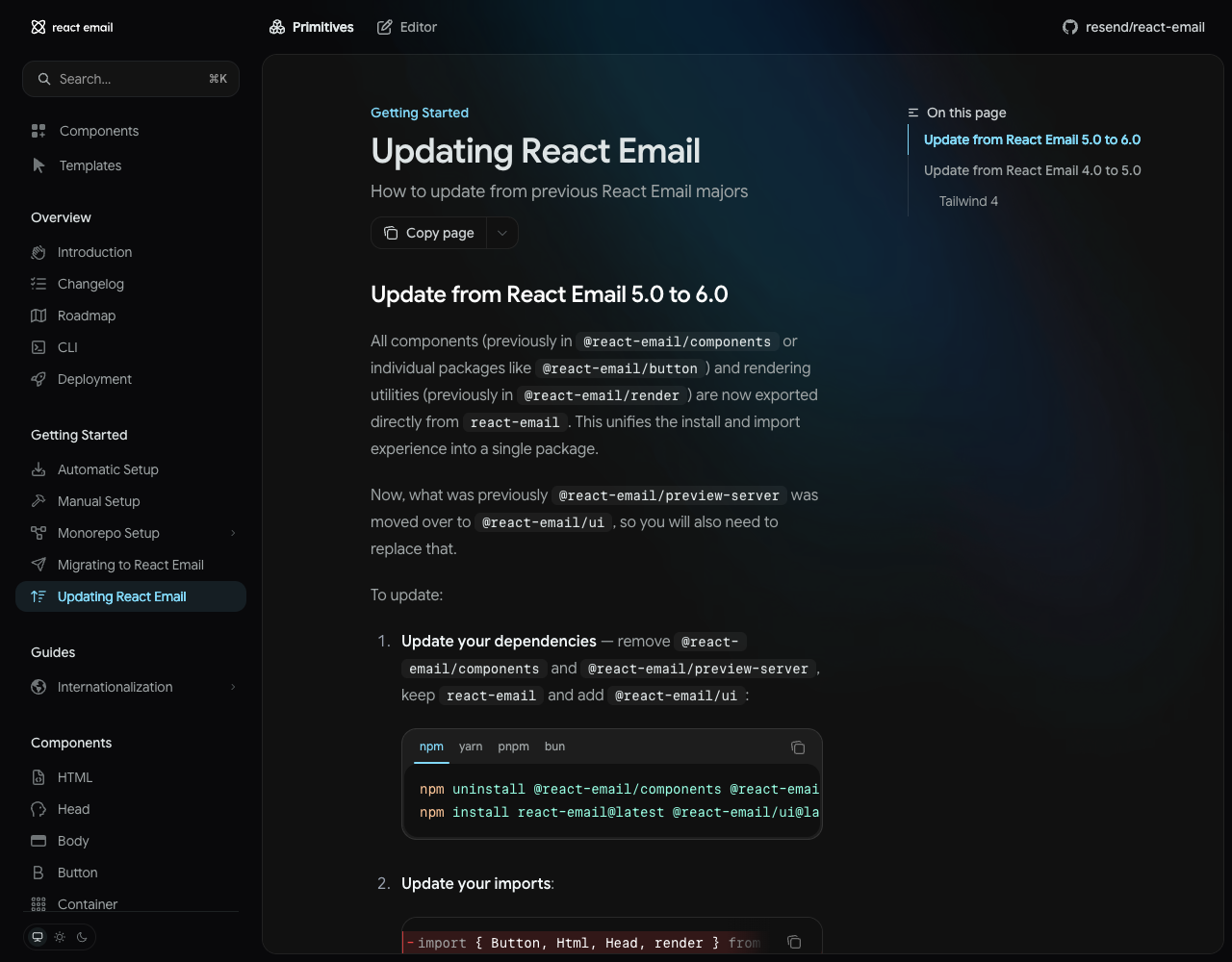
React Email 6.0.0, released on 16 April 2026, moved every component and the render utilities into one package, react-email, and renamed the preview server package (update guide). npm now marks @react-email/components as deprecated, yet much existing code still pulls it in: 4.1 million downloads in the week of 15–21 September 2026, more than react-email itself (3.0 million). Tutorials written before April 2026 use the old names.
| If older code uses | Use now |
|---|---|
@react-email/components | react-email |
render or toPlainText from @react-email/render | the same functions from react-email, which re-exports that package |
@react-email/preview-server | @react-email/ui, as a dev dependency |
renderAsync() | await render() (the change came in React Email 5.0) |
Step 1. Install React Email in your Next.js app
npx create-email@latest builds a separate react-email-starter folder, so for an existing app follow React Email's manual setup. Your project already has react and react-dom; react-email accepts React 18 or 19.
Illustrative code, written from the official documentation and not run by the editorial team.
npm install react-email -E
npm install @react-email/ui -D -E
npm install server-only
Then add a preview script to package.json:
{
  "scripts": {
    "email:dev": "email dev --dir emails --port 3001"
  }
}
The email dev preview and next dev both default to port 3000 (React Email CLI, Next.js CLI), so the preview gets 3001. If your code lives in src/, use --dir src/emails.
Step 2. Write the email as a React component
Illustrative code, written from the official documentation and not run by the editorial team.
// emails/welcome.tsx (illustrative, not run)
import * as React from "react";
import { Body, Button, Container, Head, Heading, Html, Preview, Text } from "react-email";

type WelcomeEmailProps = { name: string; dashboardUrl: string };

export default function WelcomeEmail({ name, dashboardUrl }: WelcomeEmailProps) {
  return (
    <Html lang="en">
      <Head />
      <Preview>Your Acme account is ready</Preview>
      <Body style={{ backgroundColor: "#f6f7f9", fontFamily: "Arial, sans-serif" }}>
        <Container style={{ backgroundColor: "#ffffff", padding: "24px", maxWidth: "560px" }}>
          <Heading style={{ fontSize: "22px" }}>Welcome, {name}</Heading>
          <Text>Your account is ready. Open the dashboard to finish setup.</Text>
          <Button
            href={dashboardUrl}
            style={{ backgroundColor: "#111827", color: "#ffffff", padding: "12px 20px", borderRadius: "6px" }}
          >
            Open dashboard
          </Button>
        </Container>
      </Body>
    </Html>
  );
}

// Sample data for the preview server only
WelcomeEmail.PreviewProps = { name: "Ada", dashboardUrl: "https://example.com/dashboard" } satisfies WelcomeEmailProps;
The components ship unstyled, so styles go in style props or inside the Tailwind component, which uses Tailwind 4 since React Email 5. <Preview> sets the line inbox apps show after the subject. The preview server lists a .tsx file only if it has an export default; put shared pieces in a folder whose name starts with _, such as emails/_components, to keep them off the list.
Step 3. Preview the template
Run npm run email:dev, open http://localhost:3001, and edit the file; the preview rebuilds on save with the PreviewProps data.
Images in emails/static are served by the preview server only, the CLI docs warn, so a sent email needs absolute image URLs on a public host; switch the base URL on NODE_ENV. The toolbar's Resend tab is optional: it uploads templates to Resend's hosted Templates and needs a full-access Resend key.
Step 4. Render HTML and plain text on the server
Illustrative code, written from the official documentation and not run by the editorial team.
// lib/email/welcome.tsx (illustrative, not run)
import "server-only";
import { render, toPlainText } from "react-email";
import WelcomeEmail from "@/emails/welcome";

export async function renderWelcomeEmail(props: { name: string; dashboardUrl: string }) {
  const html = await render(<WelcomeEmail {...props} />);
  const text = toPlainText(html);
  return { html, text };
}
render() returns a Promise of the HTML string, per the type in @react-email/render 2.1.0, so it needs await. toPlainText() builds the text part; add data-skip-in-text="true" to an element to leave it out of the text (render docs). Resend builds a text part from HTML if you omit it; the other SDKs in Step 6 take text as a separate field. The server-only import turns any Client Component import of this file into a build error (Next.js docs).
Step 5. Send from a Server Action or a Route Handler
Use a Server Action when your own UI triggers the email, such as a form. Use a Route Handler when something outside the UI calls your app: a job runner, another service, a webhook.
Keep the API key server-side
Illustrative code, written from the official documentation and not run by the editorial team.
# .env.local (create-next-app's default .gitignore excludes .env files)
RESEND_API_KEY=re_xxxxxxxx
EMAIL_FROM="Acme <hello@notify.example.com>"
No NEXT_PUBLIC_ prefix: Next.js inlines those values into browser JavaScript at build time, and replaces unprefixed variables in client code with an empty string (environment variables guide). On Vercel, add the same names under the project's environment variables; Vercel applies changes to new deployments only, so redeploy.
The send function, the only provider-specific file
The example uses Resend for two reasons: it was the only provider AI search engines named when we researched this question, and React Email's own docs have no Next.js page while Resend's docs have one. Nothing outside this file depends on that choice; Step 6 has the same function for four other providers.
Illustrative code, written from the official documentation and not run by the editorial team.
// lib/email/send.ts (illustrative, not run). npm install resend
import "server-only";
import { Resend } from "resend";

export type OutgoingEmail = { to: string; subject: string; html: string; text: string; idempotencyKey?: string };

export async function sendEmail(email: OutgoingEmail) {
  const resend = new Resend(process.env.RESEND_API_KEY); // created per call, so a missing key fails here, not at import
  const { data, error } = await resend.emails.send(
    { from: process.env.EMAIL_FROM!, to: [email.to], subject: email.subject, html: email.html, text: email.text },
    { idempotencyKey: email.idempotencyKey }, // second argument, per the SDK type
  );
  if (error) throw new Error(`Email not sent: ${error.name}`); // the SDK returns errors instead of throwing
  return data?.id;
}
Resend keeps an idempotency key for 24 hours, so a retry with the same key does not send twice (idempotency docs). The SDK can also render the component itself through a react field, but Resend's Next.js guide passes WelcomeEmail({ name }) as a function call while React Email's Resend page passes JSX. Rendering yourself avoids the question.
From a Server Action
Illustrative code, written from the official documentation and not run by the editorial team.
// app/actions/welcome.ts (illustrative, not run)
"use server";
import { getCurrentUser } from "@/lib/auth"; // your auth library
import { renderWelcomeEmail } from "@/lib/email/welcome";
import { sendEmail } from "@/lib/email/send";

// Call it from a form or button: <form action={sendWelcomeEmail}><button>Send welcome email</button></form>
export async function sendWelcomeEmail() {
  const user = await getCurrentUser();
  if (!user) throw new Error("Unauthorized");

  const { html, text } = await renderWelcomeEmail({ name: user.name, dashboardUrl: "https://example.com/dashboard" });
  await sendEmail({ to: user.email, subject: "Welcome to Acme", html, text, idempotencyKey: `welcome/${user.id}` });
}
Next.js warns that Server Functions are reachable by direct POST requests, not only through your UI, so check authentication inside every one (mutating data). Take the recipient from the session or your database, never from form input; otherwise any signed-in user can send mail from your domain to any address.
From a Route Handler
Illustrative code, written from the official documentation and not run by the editorial team.
// app/api/emails/welcome/route.ts (illustrative, not run)
import { timingSafeEqual } from "node:crypto";
import { db } from "@/lib/db"; // your data layer
import { renderWelcomeEmail } from "@/lib/email/welcome";
import { sendEmail } from "@/lib/email/send";

function authorized(req: Request) {
  const secret = process.env.INTERNAL_API_SECRET;
  if (!secret) return false; // unset secret must never match "Bearer undefined"
  const got = Buffer.from(req.headers.get("authorization") ?? "");
  const want = Buffer.from(`Bearer ${secret}`);
  return got.length === want.length && timingSafeEqual(got, want);
}

export async function POST(req: Request) {
  if (!authorized(req)) return new Response(null, { status: 401 });
  const { userId } = await req.json();
  const user = await db.users.find(userId);
  if (!user) return Response.json({ error: "not found" }, { status: 404 });

  const { html, text } = await renderWelcomeEmail({ name: user.name, dashboardUrl: "https://example.com/dashboard" });
  const id = await sendEmail({ to: user.email, subject: "Welcome to Acme", html, text, idempotencyKey: `welcome/${user.id}` });
  return Response.json({ id });
}
POST Route Handlers are not cached and run on the Node.js runtime by default; the Next.js 16.3.6 docs mark export const runtime = 'edge' as deprecated, so leave it out. For payment or auth webhooks that sign their requests, verify the signature on the raw body instead of a shared secret, as in the receipt scenario of our transactional email setup guide. Most email providers sign their bounce and complaint webhooks as well, though Postmark relies on Basic auth instead; each provider card shows the scheme.
Step 6. Swap the email provider
Rewrite sendEmail with another SDK; the template and callers stay as they are. React Email's docs have sending pages for Nodemailer and more than ten providers (integrations overview); these are the five in our catalog.
| Provider | npm package (latest, 23 Sep 2026) | Call inside sendEmail | Free option (our data, checked 23 Sep 2026) |
|---|---|---|---|
| Amazon SES | @aws-sdk/client-sesv2 3.1138.0 | new SESv2Client({ region }).send(new SendEmailCommand({ FromEmailAddress, Destination: { ToAddresses: [to] }, Content: { Simple: { Subject: { Data: subject }, Body: { Html: { Data: html }, Text: { Data: text } } } } })) | No always-free quota; up to $200 in AWS credits for new customers (card required); sandbox sends only to verified addresses |
| Mailgun | mailgun.js 14.0.1 | new Mailgun(FormData).client({ username: "api", key }).messages.create(domain, { from, to: [to], subject, html, text }) | 100 emails a day; sandbox domain sends to up to 5 authorized recipients |
| Postmark | postmark 5.1.0 | new ServerClient(token).sendEmail({ From, To, Subject, HtmlBody, TextBody }) | 100 emails a month, no expiry; own domains only until the account is approved |
| Resend | resend 6.28.1 | Step 5 | 3,000 emails a month, capped at 100 a day |
| SendGrid | @sendgrid/mail 8.1.6 | sgMail.setApiKey(key); await sgMail.send({ to, from, subject, html, text }) | 60-day trial at 100 emails a day; no free-forever plan |
Calls follow each vendor's SDK docs under Sources; free options come from our provider data files. Three details to watch: React Email's own AWS SES page uses the older @aws-sdk/client-ses (SES API v1); the row above is API v2. Mailgun accounts on EU infrastructure also pass url: "https://api.eu.mailgun.net". Postmark sends through the default transactional stream, outbound, unless you set MessageStream.
The other four document no idempotency key for these send calls, so record a "sent" marker keyed on the event before calling, as our transactional email guide explains in its email API vs SMTP section. Prices at your volume, AI readiness and reputation are compared in our transactional email API rankings.
Authenticate your sending domain
Every provider here sends to other people only from a verified domain or sender. Before that, Resend returns a 403 validation_error for any recipient other than your own address, SendGrid returns 403 Forbidden without a verified sender identity, and Postmark returns 422 when the From address has no confirmed sender signature. Use a subdomain such as notify.example.com and publish the SPF, DKIM and DMARC records your provider gives you; the SPF, DKIM and DMARC walkthrough covers the records and the Gmail, Yahoo and Outlook rules.
Common errors
| Symptom | Cause | Fix |
|---|---|---|
npm warns that @react-email/components is deprecated | Code written for React Email 5 or earlier | Uninstall it and import everything from react-email |
Old tutorial code calls renderAsync | Replaced by render in React Email 5.0 | await render(...) |
TypeScript: Promise<string> is not assignable to string | render() called without await | Await it before passing html |
Missing API key. Pass it to the constructor | new Resend() found no RESEND_API_KEY in that environment (message from the resend 6.28.1 source) | Set the variable where the code runs; on Vercel, redeploy after adding it |
| Build error that a module can only be used on the server | A Client Component imports lib/email/* | Call a Server Action from the component instead |
| Resend 403: "You can only send testing emails to your own email address" | Sending from the test domain | Verify a domain and use it in from |
| Resend 429 | Default limit of 10 requests per second per team, or the free plan's daily quota | Queue sends, or move to a paid plan |
| Images show in the preview but not in the inbox | emails/static is served by the preview server only | Absolute URLs on a public host |
Resend's error codes and limits come from its errors reference and quota page.
If an AI assistant writes the code
Assistants working from older tutorials can bring back the deprecated imports, so name the packages. React Email's llms.txt, a docs map for language models, links an official React Email agent skill, and Resend's resend-skills plugin includes one too. Our MCP servers and agent skills dataset lists what each email provider publishes for agents. A prompt that pins the choices in this tutorial, which we have not run:
Add a welcome email to this Next.js App Router app with React Email 6.
- Install react-email (components and render come from it) and @react-email/ui as a dev dependency.
  Do not use @react-email/components or renderAsync.
- Template in emails/welcome.tsx with PreviewProps; "email:dev" script on port 3001.
- lib/email/welcome.tsx renders HTML with await render() and text with toPlainText(); import "server-only".
- lib/email/send.ts is the only file that knows the provider ([PROVIDER], docs: [URL]).
  Read the key from process.env.[PROVIDER]_API_KEY; never NEXT_PUBLIC_, never hardcoded or logged.
- Send from a Server Action that checks the signed-in user and takes the address from the session.
- Then list every file that reads the key so I can confirm none is a Client Component.
Related guides
- Email MCP servers compared: which email APIs an AI agent can drive, and with what permissions
- Free email API and SMTP relay tiers compared: monthly and daily caps, card rules, catches
- Transactional email: what it is and how to set it up
- Send email from a Lovable app with Supabase, the same key-on-the-server pattern for Supabase Edge Functions
- Supabase "email rate limit exceeded": causes and fixes, if your Next.js app uses Supabase Auth
- Best transactional email APIs, scored with published weights
- The directory's read-only API and MCP server, for agents comparing providers
About this guide
The PingMyUsers editorial team wrote this tutorial for developers adding email to a Next.js app; Sensaria AG in Switzerland operates the directory. We did not create provider accounts, run the code or send email. No provider paid for placement or reviewed this page. Resend appears in the main example for the reasons given in Step 5; that is not a recommendation. Report errors to contact@sensaria.ch with a source.
Methodology
On 23 September 2026 we read React Email's docs and changelog, the Next.js 16.3.6 docs and each provider's SDK page listed under Sources. Package versions, the deprecation flag and weekly download counts come from the npm registry that day; function signatures come from the published type definitions. Free options come from our provider data files, where each field has a source, an evidence status and a check date. Section order follows the searches GPT and Gemini ran for ten phrasings of this question; GPT answered 8 of 50 attempts, the rest hit API rate limits. Editorial rules are on the methodology page.
Last updated
23 September 2026: first version, all facts checked that day. Next check: at publication, then March 2027 or at the next React Email or Next.js major release.
Frequently asked questions
What is React Email?
An open-source MIT library, maintained by Resend, that turns React components into HTML email. Since version 6 (16 April 2026), components and render ship in one package, react-email.
Do I need Resend to use React Email?
No. render() returns an HTML string that any provider's API or SMTP relay accepts. React Email's docs include sending guides for SendGrid, Postmark, AWS SES, Mailgun, Nodemailer and others.
Is @react-email/components deprecated?
Yes. React Email 6 moved its components into react-email, and npm marks @react-email/components as deprecated. Replace the imports; the component names are the same.
Should I send email from a Server Action or a Route Handler?
A Server Action when your own UI triggers the email; a Route Handler when an outside caller, such as a job or a webhook, does. Both need an auth check.
Where do I put the email API key in Next.js?
In .env.local without the NEXT_PUBLIC_ prefix, and in your host's environment variables for production. Read it only in files that import server-only.
How do I create a plain-text version of a React Email template?
Pass the rendered HTML to toPlainText(), or call render() with { plainText: true }. Mark parts to leave out with data-skip-in-text="true".
Can I send email from the Edge runtime in Next.js?
The Next.js 16.3.6 docs mark the Edge runtime as deprecated for routes. Keep email code on the default Node.js runtime and leave out export const runtime = 'edge'.
Sources
- React Email — Introduction — checked 23 September 2026
- React Email — Manual setup — checked 23 September 2026
- React Email — Updating React Email (5.0 to 6.0) — checked 23 September 2026
- React Email — Changelog (React Email 6.0.0, 16 April 2026) — checked 23 September 2026
- React Email — Render utility — checked 23 September 2026
- React Email — CLI (email dev, PreviewProps, static files) — checked 23 September 2026
- React Email — Integrations overview — checked 23 September 2026
- React Email — Send email using Resend — checked 23 September 2026
- React Email — Send email using AWS SES — checked 23 September 2026
- React Email — llms.txt (links the React Email agent skill) — checked 23 September 2026
- npm — react-email 6.9.5 — checked 23 September 2026
- npm — @react-email/components (marked deprecated) — checked 23 September 2026
- npm downloads API — react-email, week of 15–21 September 2026 — checked 23 September 2026
- npm downloads API — @react-email/components, week of 15–21 September 2026 — checked 23 September 2026
- Next.js — Route Handlers (docs for 16.3.6) — checked 23 September 2026
- Next.js — Mutating Data (Server Functions and Server Actions) — checked 23 September 2026
- Next.js — Environment variables — checked 23 September 2026
- Next.js — Server and Client Components (server-only) — checked 23 September 2026
- Next.js — runtime segment config (Edge deprecated) — checked 23 September 2026
- Next.js — CLI (default port 3000) — checked 23 September 2026
- Vercel — Environment variables — checked 23 September 2026
- Resend — Send emails with Next.js — checked 23 September 2026
- Resend — Send email API reference — checked 23 September 2026
- Resend — Idempotency keys — checked 23 September 2026
- Resend — Errors — checked 23 September 2026
- Resend — Account quotas and limits — checked 23 September 2026
- npm — resend 6.28.1 (Node.js SDK) — checked 23 September 2026
- Postmark — Sending email with API — checked 23 September 2026
- npm — postmark 5.1.0 — checked 23 September 2026
- Twilio SendGrid — Node.js quickstart — checked 23 September 2026
- GitHub — @sendgrid/mail README — checked 23 September 2026
- AWS SDK for JavaScript v3 — SESv2 SendEmailCommand — checked 23 September 2026
- GitHub — mailgun.js README — checked 23 September 2026
- Resend — pricing — checked 23 September 2026
- Postmark — pricing — checked 23 September 2026
- Twilio SendGrid — Email API pricing — checked 23 September 2026
- Amazon SES — pricing — checked 23 September 2026
- Mailgun — pricing — checked 23 September 2026