How to send email from a Lovable app with Supabase
Editorial team · updated · facts checked
An app on Supabase sends two kinds of email by two paths. Auth emails (sign-up confirmations, password resets, magic links) leave through Supabase Auth, which needs your email provider's SMTP credentials. App emails (receipts, notifications) leave through a Supabase Edge Function that calls the provider's API with the key stored in secrets. In a Lovable app on a paid plan, Lovable's built-in Emails can also send app emails, and auth emails when the app runs on Lovable Cloud.
We checked every page cited here on 23 September 2026 but did not build the app or send email, so the code and the Lovable prompt are illustrative, written from the official docs.
First, check which backend your Lovable app uses
Lovable Cloud is Lovable's built-in backend, managed inside Lovable; Lovable says it uses Supabase's open-source foundation. Your own Supabase project connects through Lovable's Supabase integration and is managed in the Supabase dashboard. More → Cloud shows which one a project uses.
| Lovable Cloud | Your own Supabase project | |
|---|---|---|
| Auth email settings | More → Cloud → Users → Auth settings | Supabase dashboard, Authentication |
| API keys | More → Cloud → Secrets (write-only) | Supabase Edge Function secrets |
| Lovable Emails for auth emails | Yes, paid plans | No (Lovable sends them through Cloud Auth) |
| Lovable Emails for app emails | Yes, paid plans | Yes, paid plans |
| Supabase custom SMTP | Not in the Lovable pages we checked | Yes |
Sources: Lovable's Supabase integration, Secrets and Email authentication pages. One conflict: the Supabase page says app emails from your domain work with your own Supabase project, while the Emails page says React + Vite projects need Cloud for them (TanStack Start projects have their own server). Check More → Cloud → Emails in your project.
What Lovable does natively: Lovable Emails and three connectors
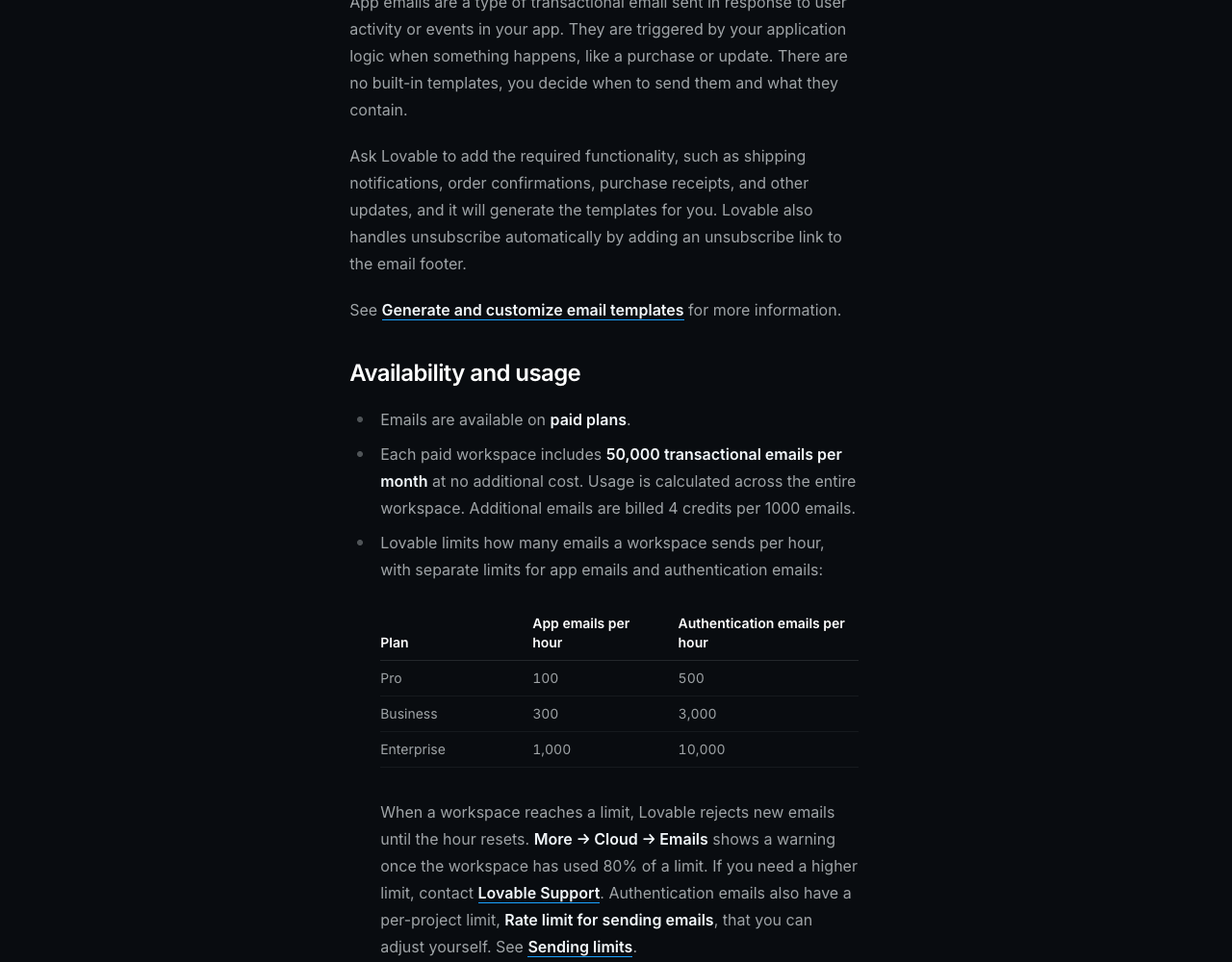
Lovable Emails needs no provider account or API key. Each paid workspace gets 50,000 transactional emails a month, and Lovable bills 4 credits per 1,000 beyond that. You delegate a sender subdomain such as notify.yourdomain.com to Lovable with NS records, and Lovable maintains its SPF, DKIM and DMARC. Sending is capped per hour: 100 app emails and 500 auth emails on Pro, 300 and 3,000 on Business, and Lovable rejects anything over the cap until the hour resets. Marketing email is not supported.
Lovable has connectors for three transactional email providers: Resend, Mailgun and Brevo. You paste the provider's API key once under Connectors, link it to a project, and the provider bills the sending. None of the three receives provider webhooks, and the Resend and Mailgun connectors cannot verify your domain. Lovable's pages suggest a connector for marketing email, more volume or an existing provider account, and Lovable Emails for standard transactional mail.
Path A: auth emails through Supabase custom SMTP
Supabase's built-in SMTP server is for testing. Per Supabase's custom SMTP page, it delivers only to members of the project's team (others fail with Email address not authorized) and is currently limited to 2 messages per hour. Since 3 June 2026, new free-tier projects on it also cannot edit auth email templates.
With your own Supabase project:
- Verify your sending domain at the provider (see below).
- Copy the provider's SMTP host, port, username and password. Resend's Supabase guide gives
smtp.resend.com, port465, usernameresend, and your API key as the password. - In the Supabase dashboard, open SMTP settings under Authentication, enable custom SMTP, and add a sender such as
no-reply@notify.example.com. - Raise the limit: after you save, Supabase allows 30 messages per hour until you change it on the Rate Limits page. See our fix for Supabase's "email rate limit exceeded" error.
For a provider without SMTP, or custom logic such as per-language templates, enable the Send Email Hook instead: Supabase Auth calls an HTTP endpoint, typically an Edge Function, SMTP is no longer used, and the endpoint verifies each request with a secret from the Auth Hooks page.
On Lovable Cloud, branded auth email goes through Lovable Emails (More → Cloud → Emails). The per-project Rate limit for sending emails, under Advanced in the email auth settings, can be raised only after email sending is set up.
Path B: app emails from a Supabase Edge Function
An Edge Function runs server-side on Supabase (or Lovable Cloud), so the API key never reaches the browser. The key goes in:
- Your own Supabase project: Edge Function secrets in the dashboard, or
supabase secrets set RESEND_API_KEY=.... When Lovable needs a key, it asks through a secure input and stores it there. Lovable projects that share one Supabase project overwrite each other's secrets. - Lovable Cloud: More → Cloud → Secrets.
Never use a VITE_ variable: it is built into the browser bundle, and Lovable's Secrets view rejects the prefix. Two more rules keep the function from becoming an open relay. Require a signed-in caller: withSupabase({ auth: "user" }) from @supabase/server checks the JWT and returns a client bound by your row-level security. And decide the recipient on the server: accept an order ID, not a to address and HTML, and send only for a paid order.
Illustrative code, written from the official documentation and not run by the editorial team.
// supabase/functions/send-receipt/index.ts (illustrative, not run)
import { withSupabase } from "npm:@supabase/server@^1";

const RESEND_API_KEY = Deno.env.get("RESEND_API_KEY")!; // from secrets, never frontend code

export default {
  fetch: withSupabase({ auth: "user" }, async (req, ctx) => {
    const { orderId } = await req.json();

    // RLS-scoped client: a user can load only their own order
    const { data: order, error } = await ctx.supabase
      .from("orders")
      .select("id, number, total, status, customer_email")
      .eq("id", orderId)
      .single();
    if (error || !order) return Response.json({ error: "not found" }, { status: 404 });
    if (order.status !== "paid") return Response.json({ error: "not paid" }, { status: 409 });

    const res = await fetch("https://api.resend.com/emails", {
      method: "POST",
      headers: {
        Authorization: `Bearer ${RESEND_API_KEY}`,
        "Content-Type": "application/json",
        "Idempotency-Key": `receipt/${order.id}`, // a retry cannot send a second receipt
      },
      body: JSON.stringify({
        from: "Example <receipts@notify.example.com>", // domain verified at the provider
        to: [order.customer_email],
        subject: `Your receipt for order ${order.number}`,
        html: `<p>We received $${order.total} for order ${order.number}.</p>`,
      }),
    });
    return Response.json({ sent: res.ok }, { status: res.ok ? 200 : 502 });
  }),
};
The app calls it with supabase.functions.invoke("send-receipt", { body: { orderId } }). If a server-side payment webhook confirms orders, send the receipt from that handler instead, so the browser never triggers it. The request follows Supabase's Resend example; for another provider, swap the endpoint, auth header and body.
A Lovable prompt that keeps the API key server-side
Resend's Lovable page says Lovable may "Add the API key directly in the code". A prompt that names the secret and the caller check rules that out. This is a prompt for Lovable's chat, not code, and we have not run it:
Add order receipt emails.
- Create an edge function "send-receipt" that sends through [PROVIDER] (API docs: [URL]).
- Ask me for the API key with the secure secret input and store it as the secret
  [PROVIDER]_API_KEY. Never put it in frontend code, .env or a VITE_ variable; never log it.
- Require a signed-in user. Accept only an orderId, load the order with the user's
  permissions, send only if it is paid, and send to the email address stored on it.
- Send from receipts@notify.[mydomain.com], verified at [PROVIDER].
- Use the order ID as an idempotency key so a retry cannot send twice.
- Call it from the checkout success page with supabase.functions.invoke, or from the
  payment webhook handler if the app has one.
- Then list every file that reads the key so I can confirm none runs in the browser.
Verify your sending domain
Providers deliver to other people only from a domain you have verified with them. Resend's test sender, onboarding@resend.dev, reaches only the account owner, and Resend notes that Lovable keeps it in the function until you ask Lovable to change the From address and redeploy.
For Lovable Emails, add its NS records inside your DNS zone for the sender host only: Lovable warns that replacing your registrar's nameservers takes the whole website and its email offline. SPF, DKIM and DMARC in depth are in our guide to setting up transactional email.
Handle bounces and complaints with a webhook function
Since Lovable's email connectors cannot receive webhooks, point the provider's webhook at a second Edge Function. It has no signed-in caller, so Supabase's External webhooks pattern applies: verify_jwt = false in supabase/config.toml, auth: "none" in the handler, and a check of the provider's signature on the raw body before parsing. Then write hard bounces and complaints to a suppression table the sending function checks first.
For Resend, verify the svix-id, svix-timestamp and svix-signature headers and store each svix-id to drop retried duplicates. Lovable Emails suppresses unsubscribed addresses itself and shows bounces under Analytics and logs; we found no outbound webhook in its docs.
Costs at 10,000 emails a month, and which providers have a Lovable connector
With Lovable Emails on a paid plan, 10,000 emails a month add nothing, since 50,000 are included; Lovable Pro starts at $25 a month billed monthly. Edge Function runs are billed by Supabase on your own project, or in Lovable credits on Cloud; neither is priced here. Provider list prices:
| Provider | Lovable connector | SMTP for Supabase Auth | Webhook signature | 10,000 emails a month |
|---|---|---|---|---|
| Amazon SES | No | Yes | Amazon SNS signature | $1.00 à la carte; $1.60 on Essentials, the default for new accounts |
| Mailgun | Yes | Yes | HMAC-SHA256 | $15, Basic |
| Postmark | No | Yes | None; Basic auth plus IP allowlist | $15, Basic |
| Resend | Yes | Yes | HMAC-SHA256 via Svix | $20, Pro (Free stops at 3,000 a month) |
| SendGrid | No | Yes | ECDSA, opt-in | $19.95, Essentials 50K |
| Telnyx | No | No SMTP documented | Ed25519 with timestamp | $3.00, beta rates |
Connector status from Lovable's docs, other cells from our provider data files, all checked 23 September 2026; USD, monthly billing. Brevo, which also has a Lovable connector, is not in our catalog yet.
SES has the lowest list price but no connector, and new accounts start in a sandbox that sends only to verified addresses. Among catalog providers with a connector, Mailgun costs least. Telnyx cannot serve Path A without SMTP. Scores that also weigh AI readiness and reputation are in our transactional email API rankings.
Related guides
- Free email API and SMTP relay tiers compared: monthly and daily caps, card rules, catches
- Transactional email: what it is and how to set it up
- Supabase "email rate limit exceeded": causes and fixes
- Best transactional email APIs, scored with published weights
- Send email from Next.js with React Email templates, if your app runs on Next.js
- Vibe coding security checklist: exposed keys, Supabase RLS and webhook checks in Lovable apps
- Email API vs SMTP relay, if you are choosing how the Edge Function sends
- The directory's read-only API and MCP server for agents
About this guide
The PingMyUsers editorial team wrote this tutorial; Sensaria AG in Switzerland operates the directory. Providers do not pay for placement, and none reviewed this page. Resend is the code example because AI search engines named it for this task and Supabase's own example uses it; that is not a recommendation. Report errors to contact@sensaria.ch with the source that shows the correct fact.
Methodology
On 23 September 2026 we read the Lovable, Supabase and Resend pages listed under Sources and the pricing and webhook pages behind our provider cards; prices are as printed, in USD. We opened no provider accounts and sent no email. Section order follows the 43 searches Gemini ran for 10 phrasings of this question; GPT's run mostly failed on API rate limits. Provider scoring is explained on the methodology page.
Last updated
23 September 2026: first version, all facts checked that day. Next scheduled re-check: March 2027, or sooner if Lovable's or Supabase's email limits change.
Frequently asked questions
Can Supabase send emails without an external provider?
Only for testing: the built-in SMTP server sends auth emails only to your project team, currently 2 an hour, with no delivery SLA. App emails need a provider called from an Edge Function.
How do I send email from a Supabase Edge Function?
Store the provider's API key as an Edge Function secret, read it with Deno.env.get, and POST to the provider's send endpoint. Require a signed-in caller and choose the recipient on the server.
Does Lovable have built-in email?
Yes, on paid plans: Lovable Emails, with 50,000 transactional emails a month per workspace. It sends auth emails only for apps on Lovable Cloud, and no marketing email.
Do I need Resend to send email from Lovable?
No. Lovable Emails needs no provider, Lovable also has Mailgun and Brevo connectors, and any provider with an HTTP API works from an Edge Function.
Where should I put my email API key in a Lovable app?
In secrets: More → Cloud → Secrets on Lovable Cloud, or Edge Function secrets in your own Supabase project. Never in frontend code or a VITE_ variable.
Sources
- Lovable — Send branded emails from your own domain (Lovable Emails) — checked 23 September 2026
- Lovable — Connect to Supabase — checked 23 September 2026
- Lovable — Lovable Cloud — checked 23 September 2026
- Lovable — Secrets — checked 23 September 2026
- Lovable — Edge functions — checked 23 September 2026
- Lovable — Email authentication for your app — checked 23 September 2026
- Lovable — Connect your app to Resend — checked 23 September 2026
- Lovable — Connect your app to Mailgun — checked 23 September 2026
- Lovable — Connect your app to Brevo — checked 23 September 2026
- Lovable — App + chat connectors — checked 23 September 2026
- Lovable — Integration security (connector gateway) — checked 23 September 2026
- Lovable — Security best practices for Lovable apps — checked 23 September 2026
- Lovable — Subscription plans — checked 23 September 2026
- Supabase — Send emails with custom SMTP — checked 23 September 2026
- Supabase — Send Email Hook — checked 23 September 2026
- Supabase — Auth rate limits — checked 23 September 2026
- Supabase — Edge Functions environment variables and secrets — checked 23 September 2026
- Supabase — Securing Edge Functions — checked 23 September 2026
- Supabase — Sending emails from Edge Functions (Resend example) — checked 23 September 2026
- Supabase changelog — Email template customization changes on free tier (3 June 2026) — checked 23 September 2026
- Resend — Send emails using Supabase with SMTP — checked 23 September 2026
- Resend — Send emails with Lovable and Resend — checked 23 September 2026
- Resend — Verify webhook requests — checked 23 September 2026
- Resend — Webhooks introduction (svix-id de-duplication) — checked 23 September 2026
- Resend — Idempotency keys — checked 23 September 2026
- Resend — pricing — checked 23 September 2026
- Amazon SES — pricing — checked 23 September 2026
- Amazon SES — Request production access (sandbox) — checked 23 September 2026
- Amazon SNS — Verifying the signatures of Amazon SNS messages — checked 23 September 2026
- Mailgun — pricing — checked 23 September 2026
- Mailgun — Securing webhooks — checked 23 September 2026
- Postmark — pricing — checked 23 September 2026
- Postmark — Webhooks overview — checked 23 September 2026
- Twilio SendGrid — Email API pricing — checked 23 September 2026
- Twilio SendGrid — Event Webhook security features — checked 23 September 2026
- Telnyx — Email API pricing (beta) — checked 23 September 2026
- Telnyx — Email webhooks and events — checked 23 September 2026