Supabase "email rate limit exceeded": what it means and how to fix it
Editorial team · updated · facts checked
Supabase returns email rate limit exceeded (HTTP 429, code over_email_send_rate_limit) when your project has used its hourly allowance of Auth emails. On the built-in email service that allowance is 2 emails an hour, and no setting raises it. To fix the error, connect a custom SMTP provider or the Send Email Auth Hook, then set a higher hourly limit.
On 23 September 2026 we read Supabase's Auth docs, changelog and GitHub source, plus each provider's pricing and SMTP pages; we did not create a Supabase project or send test messages. Domain setup and provider choice are in our transactional email guide.
What the Supabase email error messages mean
Two different limits return the same code, over_email_send_rate_limit. The message text tells them apart:
| Message the client receives | HTTP | code | Limit behind it |
|---|---|---|---|
email rate limit exceeded | 429 | over_email_send_rate_limit | Hourly cap on all Auth emails, per project |
For security purposes, you can only request this after N seconds. | 429 | over_email_send_rate_limit | Interval between emails to one user, 60 seconds by default |
Request rate limit reached | 429 | over_request_rate_limit | Per-IP limit on sign-up, sign-in and recovery endpoints |
Email address "…" cannot be used as it is not authorized | 400 | email_address_not_authorized | Built-in service sends only to your organization's team |
Error sending confirmation email (or recovery, magic link, invite) | 500 | unexpected_failure | Handover to your SMTP server failed |
The strings come from the Auth server source on GitHub, master branch as of 23 September 2026 (mail.go, errors.go, middleware.go); codes match Supabase's Auth error codes. That reference describes over_email_send_rate_limit as per-address, but the server also uses it for the project-wide cap, so read the message first.
Which limit did you hit? Check in this order
- Read the error. supabase-js returns an
AuthApiErrorwithcode,statusandmessage; match it against the table. - Check whether custom SMTP is on (Authentication > Emails > SMTP Settings). If it is off, the built-in service applies: 2 emails an hour for the whole project since 3 September 2024, per the production checklist, and delivery only to team members since 26 September 2024, per the changelog. With email confirmation on, the third Auth email in an hour fails.
- Custom SMTP is on and the error persists. You hit your own cap. Supabase applies 30 messages an hour once you save custom SMTP; the production checklist calls the same default "30 new users per hour". A cap of 0 blocks every Auth email, per the server source.
- "For security purposes…" The same user asked again inside the interval set by "Minimum interval per user" in SMTP Settings. Disable the resend button for a minute; a higher project cap will not help.
Request rate limit reached. One IP sent too many requests: 30 sign-ups and sign-ins per 5 minutes by default. If your server calls Auth for every user, all requests share its IP; the rate limits page documents passing the user's IP in theSb-Forwarded-Forheader with a secret API key.- A 500, or no email arrives. Check the project's Auth logs, then the provider's logs, as Supabase's troubleshooting note advises. Free provider tiers are small (table below).
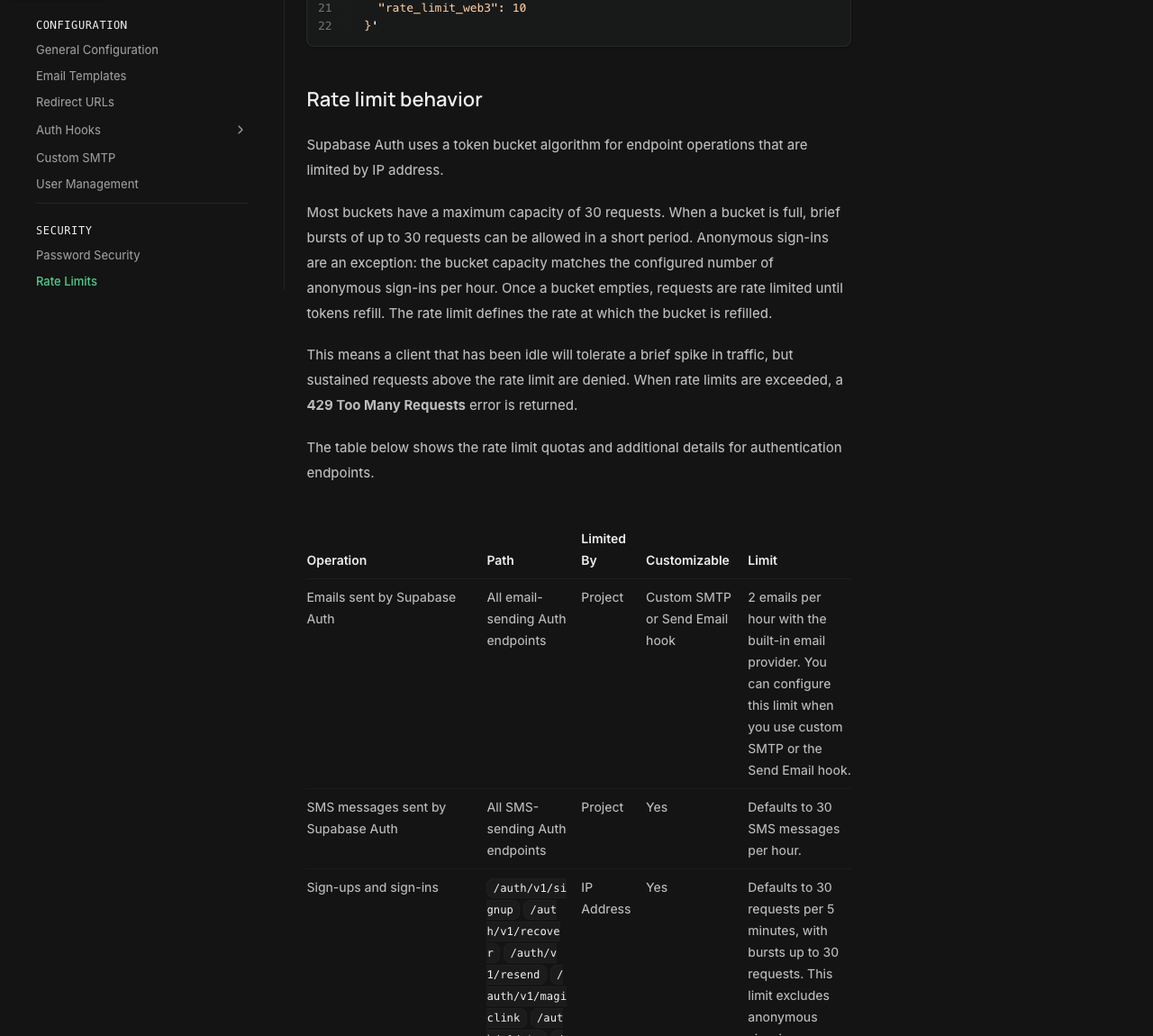
Locally, the setting is auth.rate_limit.email_sent in config.toml, default 2 (CLI reference).
Fix 1: connect a custom SMTP provider
Custom SMTP lifts the team-only rule and makes the cap editable. Since 3 June 2026, new Free-plan projects can edit Auth email templates only with custom SMTP, per the template changelog.
- Pick a provider with an SMTP relay and verify your sending domain (SPF, DKIM, DMARC), ideally a separate one such as
auth.example.com, as Supabase's SMTP guide suggests. - Open Authentication > Emails > SMTP Settings and turn on Enable custom SMTP.
- Fill in Sender email address, Sender name, Host, Port number, Minimum interval per user, Username and Password. The settings form suggests port 465 or 587, warns against 25 and flags
.gmail.comhosts as personal mail. - Save. Auth now sends to any address, capped at 30 an hour until you change it (Fix 2).
The Management API equivalent, with values from Resend's Supabase SMTP page:
curl -X PATCH "https://api.supabase.com/v1/projects/$PROJECT_REF/config/auth" \
  -H "Authorization: Bearer $SUPABASE_ACCESS_TOKEN" \
  -H "Content-Type: application/json" \
  -d '{
    "external_email_enabled": true,
    "smtp_admin_email": "no-reply@auth.example.com",
    "smtp_sender_name": "Example App",
    "smtp_host": "smtp.resend.com",
    "smtp_port": 465,
    "smtp_user": "resend",
    "smtp_pass": "YOUR_RESEND_API_KEY"
  }'
Illustrative code, written from the official documentation and not run by the editorial team.
SMTP providers for Supabase Auth
Supabase names Resend, AWS SES, Postmark, Twilio SendGrid, ZeptoMail and Brevo but accepts any SMTP service. Providers with a card in this directory:
| Provider | Free option | SMTP relay | Watch for | Checked |
|---|---|---|---|---|
| Amazon SES | AWS credits for new customers; no always-free quota | Yes, credentials per Region | Sandbox: verified recipients, 200 per 24 hours | 23 September 2026 |
| Mailgun | 100 emails a day | Yes, smtp.mailgun.org | Sandbox domain: 5 authorized recipients | 23 September 2026 |
| Postmark | 100 emails a month | Yes, smtp.postmarkapp.com | Own domains only until account approval | 23 September 2026 |
| Resend | 3,000 a month, 100 a day | Yes, smtp.resend.com | Free plan stops at 100 a day | 23 September 2026 |
| SendGrid | 60-day trial, 100 a day | Yes, smtp.sendgrid.net | Trial limits are hard | 23 September 2026 |
| Telnyx | $5 trial credit only | No SMTP page in its docs | Email API in beta; needs the Send Email hook (Fix 3) | 23 September 2026 |
SendGrid's FAQ still mentions an open-ended free SMTP plan; the row uses the dated trial wording. Size the provider for your busiest hour: a Supabase cap above the provider's quota moves the failure to the provider. Scored comparisons are in the transactional email API rankings.
Fix 2: raise the Auth email rate limit
With custom SMTP or the hook enabled, open Authentication > Rate Limits and edit Rate limit for sending emails (per hour, whole project; label from the dashboard's Rate Limits form). The Management API field is rate_limit_email_sent:
curl -X PATCH "https://api.supabase.com/v1/projects/$PROJECT_REF/config/auth" \
  -H "Authorization: Bearer $SUPABASE_ACCESS_TOKEN" \
  -H "Content-Type: application/json" \
  -d '{ "rate_limit_email_sent": 100 }'
Size it from your peak hour; confirmations, resets, magic links and invites all count. The server counts in fixed one-hour windows, so at the default cap of 30 a launch with 150 sign-ups gets this error from the 31st confirmation until the window resets. At a cap of 200 on Resend Free, Resend refuses everything past 100 emails that day instead.
Fix 3: send through the Send Email Auth Hook
The Send Email Hook replaces built-in sending: Auth calls your HTTP endpoint or Postgres function, and your code calls any provider's API; SMTP settings are ignored. The Auth Hooks page lists it on Free and Pro, and it also unlocks the Fix 2 field.
Pick it when the provider has no SMTP relay (Telnyx), for React Email templates, or to queue sends with a fallback provider. HTTP hooks should finish within 5 seconds, Postgres hooks within 2.
What not to do
- Don't disable email confirmation to stop the errors. The Auth server skips the hourly check when confirmation is off, but a code comment marks that for removal, and Supabase's SMTP guide warns: "Do not disable email confirmations under pressure."
- Don't raise the cap to absorb bots. If unknown sign-ups fill the hour, add CAPTCHA, which Supabase calls the most effective control.
Related guides
- Free email API and SMTP relay tiers compared: monthly and daily caps, card rules, catches
- Transactional email: what it is and how to set it up
- Send email from a Lovable and Supabase app
- Send email from Next.js with React Email templates
- Email API vs SMTP relay: when Supabase needs SMTP and when an API call is simpler
- Best transactional email APIs, scored with published weights
- Vibe coding security checklist for Supabase apps built with AI tools
- Every provider card in the catalog
About this guide
Written by the PingMyUsers editorial team; Sensaria AG (Switzerland) operates the directory. Supabase and the listed providers do not pay for placement and did not review this page. Report errors to contact@sensaria.ch with a source that shows the correct fact.
Methodology
We read every source listed here on 23 September 2026. Error strings and dashboard labels come from Supabase's GitHub code; provider rows match our data files, with free tiers re-read at each provider. No account was created and no email was sent, so the page makes no delivery claims. Section order follows 71 searches that GPT and Gemini ran for this error. Provider scoring is on the methodology page.
Last updated
23 September 2026: first version. Supabase says the built-in limit can change without notice; next scheduled re-check: March 2027.
Frequently asked questions
What does "email rate limit exceeded" mean in Supabase?
Your project reached its hourly limit on Auth emails, so Supabase Auth refused the next one with HTTP 429 and code over_email_send_rate_limit. The built-in email service allows 2 an hour.
How many emails can Supabase send per hour?
2 on the built-in service. Saving custom SMTP sets 30 an hour; with custom SMTP or the Send Email hook enabled, you choose the value under Authentication > Rate Limits.
How do I increase the Supabase email rate limit?
Enable custom SMTP or the Send Email Auth Hook, then edit "Rate limit for sending emails" under Authentication > Rate Limits, or set rate_limit_email_sent through the Management API.
Can I use custom SMTP on Supabase's free plan?
Yes. Supabase's June 2026 changelog tells new Free-plan projects needing branded auth emails to set up their own SMTP provider; the Send Email hook is also listed for Free.
Why does Supabase say "Email address not authorized"?
Without custom SMTP, Supabase Auth sends only to members of your organization's team. Add the address to the team for testing, or set up custom SMTP.
Sources
- Supabase — Rate limits (Auth) — checked 23 September 2026
- Supabase — Send emails with custom SMTP — checked 23 September 2026
- Supabase — Auth error codes — checked 23 September 2026
- Supabase — Send Email Hook — checked 23 September 2026
- Supabase — Auth Hooks (plans and timeouts) — checked 23 September 2026
- Supabase — Production checklist (Auth rate limits) — checked 23 September 2026
- Supabase — Not receiving Auth emails from the Supabase project — checked 23 September 2026
- Supabase — CLI configuration reference (auth.rate_limit.email_sent) — checked 23 September 2026
- Supabase — Management API: update a project's auth config — checked 23 September 2026
- Supabase — Enable CAPTCHA protection — checked 23 September 2026
- Supabase changelog — Auth changes to the default email provider (18 September 2024) — checked 23 September 2026
- Supabase changelog — Changes to email template customisation on free tier (3 June 2026) — checked 23 September 2026
- GitHub supabase/auth — internal/api/mail.go (email rate limit errors) — checked 23 September 2026
- GitHub supabase/auth — internal/api/errors.go (per-user interval message) — checked 23 September 2026
- GitHub supabase/auth — internal/api/middleware.go (per-IP limit message) — checked 23 September 2026
- GitHub supabase/auth — internal/ratelimit/interval.go (fixed-window email limiter) — checked 23 September 2026
- GitHub supabase/supabase — dashboard Rate Limits form — checked 23 September 2026
- GitHub supabase/supabase — dashboard SMTP settings form — checked 23 September 2026
- Resend — Send emails using Supabase with SMTP — checked 23 September 2026
- Resend — Account quotas and limits — checked 23 September 2026
- Resend — Send emails with SMTP — checked 23 September 2026
- Postmark — pricing — checked 23 September 2026
- Postmark — Send email with SMTP — checked 23 September 2026
- Postmark — How does the account approval process work? — checked 23 September 2026
- Twilio SendGrid — Email API pricing — checked 23 September 2026
- Twilio SendGrid — Getting started with SMTP — checked 23 September 2026
- Mailgun — pricing — checked 23 September 2026
- Mailgun — SMTP relay — checked 23 September 2026
- Mailgun — Sandbox domains — checked 23 September 2026
- Amazon SES — Using the SMTP interface — checked 23 September 2026
- Amazon SES — Request production access (sandbox limits) — checked 23 September 2026
- Amazon SES — pricing — checked 23 September 2026
- Telnyx — Email API pricing (beta) — checked 23 September 2026
- Telnyx — Email docs index — checked 23 September 2026
- Telnyx — Trial account levels and capabilities — checked 23 September 2026