Email API vs SMTP relay: how each works and which one your app needs
Editorial team · updated · facts checked
An email API takes each message as a JSON request over HTTPS and returns a message ID or an error. An SMTP relay is the provider's mail server: your code logs in on port 587 or 465 and hands over a finished message. Use the API when you write the sending code, SMTP when a tool accepts nothing else.
Eight of the nine email providers compared below offer both on the same account. The choice changes what your code learns when a send fails, whether a retry can send a receipt twice, and whether your host lets the connection out at all. On 24 September 2026 we read RFC 5321 and the SMTP and API pages of nine providers in our catalog, plus the network rules of seven hosting platforms. We did not send email or time anything, so this article makes no speed measurements.
What the documentation shows, in four lines:
- Of the eight providers here with an SMTP relay, only Resend documents protection against duplicate sends over SMTP.
- Postmark calls its own SMTP endpoint "a migration route" and reports some failures only after accepting the message.
- DigitalOcean blocks all three standard SMTP ports (25, 465 and 587) on Droplets; Supabase Edge Functions block 25 and 587.
- None of the nine providers' pages we read gives a speed figure for API against SMTP; SendGrid's docs say the API is faster, without a number.
How each one works
SMTP relay. RFC 5321 defines a conversation: after connecting and logging in, the client sends MAIL (the sender), one RCPT per recipient, then DATA with the whole message, headers and attachments included. Each command gets a numbered reply. Once the server answers the end of DATA with a success code, "a formal handoff of responsibility for the message occurs" (§2.1). Apps submit on port 587 with STARTTLS (RFC 6409) or on 465 with TLS from the first byte (RFC 8314, which sees no significant security difference between the two when TLS is required). Port 25 is mainly the port mail servers use to reach each other; RFC 6409 reserves 587 for submission.
Email API. You send one HTTPS request with the fields as JSON (from, to, subject, HTML, text, attachments) and an API key. The response carries a status code and usually a message ID: SendGrid's Mail Send returns 202, and Postmark's batch endpoint returns an ErrorCode for each message in the call.
Either way, the provider then queues the message and delivers it to the recipient's mail server. SPF, DKIM and DMARC are set per sending domain, not per path; the transactional email guide covers the records.
Email API vs SMTP relay, side by side
| Email API (HTTPS) | SMTP relay | |
|---|---|---|
| What your code sends | JSON fields in one request | A complete MIME message over an SMTP session |
| Setup | SDK or fetch call, API key in a server-side variable | Host, port, username and password in a mail library or a settings screen |
| Credentials | API key as a Bearer or custom header; SES signs requests with IAM keys | Often the API key as password (Mailtrap user api, Resend resend, SendGrid apikey); per-Region logins at Amazon SES, a separate SMTP key at Brevo, per-domain logins at Mailgun |
| Network | Port 443 | 587 (STARTTLS) or 465 (TLS); 2525, 2587 or 2465 at some providers; 25 blocked on many clouds |
| What you learn at send time | Status code, message ID, error code | A success reply means the relay accepted the message; Postmark's relay accepts every message and reports failures later |
| Duplicate protection | Idempotency key at Brevo (30 minutes, documented for batch sends), Resend (24 hours) and Telnyx (24 hours); none documented at Amazon SES, Mailgun, Mailtrap, Postmark, SendGrid or SMTP2GO | Only Resend documents one: the Resend-Idempotency-Key header |
| Many messages per call | Postmark 500 per batch call, Resend 100 | One message per DATA; Brevo and Postmark relays do not batch |
| Attachments | Base64 inside the JSON | Base64 inside the MIME message; same size cap at SES (40 MB) |
| Stored templates | Called by template ID plus variables | SMTP2GO: API only, per its SMTP page; for other relays, check the provider's SMTP docs |
| Bounce and delivery webhooks | Set on the account or domain | The same webhooks; Postmark sends SMTP users there for bounces |
| Required when | Your runtime blocks SMTP ports, or the provider has no relay (Telnyx) | The software only accepts SMTP settings (Supabase Auth, CMS plugins, existing mail code) |
Provider cells come from the pages under Sources, read on 24 September 2026. Full provider facts, each with its source, are on the cards for Amazon SES, Brevo, Mailgun, Mailtrap, Postmark, Resend, SendGrid, SMTP2GO and Telnyx.
Errors, retries and duplicate emails
For a password reset or a receipt, the two paths differ most after something goes wrong.
With SMTP, a reply starting with 4 is temporary and "the SMTP client SHOULD try again"; a reply starting with 5 is permanent and the client "SHOULD NOT repeat the exact request" (RFC 5321 §4.2.1). The dangerous moment is the wait after DATA. RFC 5321 §4.5.3.2.6 warns that a timeout at this point "would typically result in delivery of multiple copies of the message", because the server may already have accepted it. Your mail library cannot tell whether the message went out, and SMTP itself has no request ID to retry safely with.
An email API can close that gap with an idempotency key. Resend's idempotency docs keep a key for 24 hours and return 409 if the same key arrives with a different payload. Telnyx's send docs keep keys for up to 24 hours, and Brevo documents an idempotencyKey with a 30-minute window on its batch idempotency page. The Amazon SES SendEmail reference and Mailgun's send API description have no such field, and we found none in the send docs of Mailtrap, Postmark, SendGrid or SMTP2GO. With those, write a "sent" marker keyed on the order or event ID before calling, and check it on retry.
The API also reports some failures on the spot. Postmark's SMTP page lists the differences from its REST API:
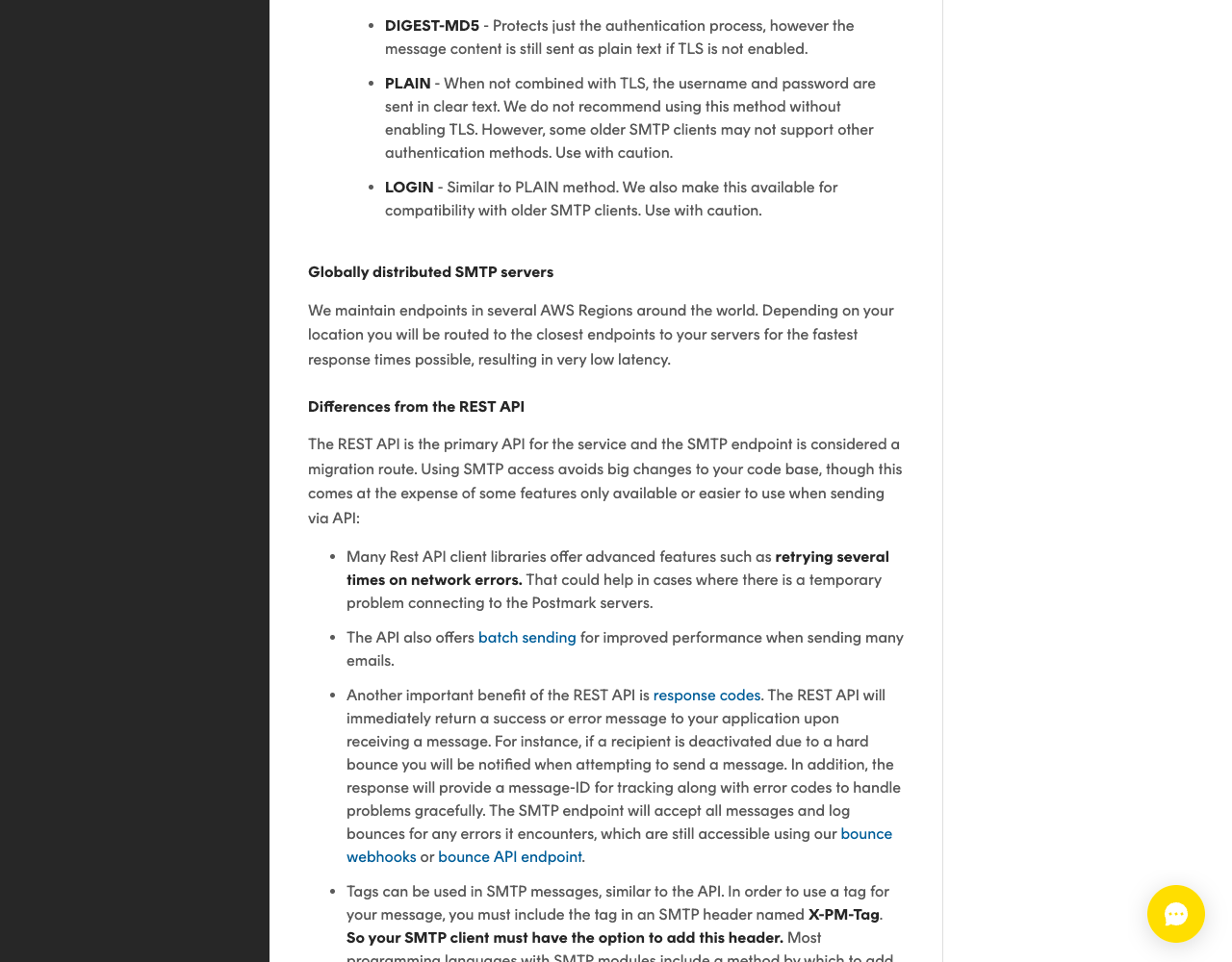
So on Postmark, an API call to an address that already hard-bounced fails in your code, where you can show the user an error. The same send over SMTP is accepted, and you find out only from a webhook. Webhooks come as signed requests at some providers and unsigned at others (Postmark uses HTTP Basic auth); each provider card shows whether that provider signs them.
Where the platform decides for you
Many hosts make the choice before you do by blocking outbound SMTP ports. Every rule below comes from the platform's own documentation, read on 24 September 2026.
| Platform | What its docs say | Consequence |
|---|---|---|
| Supabase Edge Functions | "Outgoing connections to ports 25 and 587 are not allowed" | Email API; 465 is not on the list, but the Send Email Hook examples call Resend's and Postmark's APIs |
| DigitalOcean Droplets | Ports 25, 465 and 587 blocked on all Droplets by default; recommends a third-party email provider | Email API over HTTPS; the page names no alternative SMTP port |
| AWS EC2 and Lambda | Port 25 blocked by default; removal by request, per Region | Use another port; SES also listens on 587, 2587, 465 and 2465 (SES SMTP docs) |
| Google Cloud | Port 25 to external addresses blocked; 587 and 465 not restricted | SMTP relay on 587 or 465 works |
| Azure | Port 25 blocked for VMs outside Enterprise Agreement and MCA-E subscriptions; authenticated relay on 587 not restricted | SMTP relay on 587 works |
| Cloudflare Workers | No outbound TCP connections on port 25 by default | Port 25 is out; an HTTPS email API needs no socket code |
Two more constraints come from the software, not the network. Supabase Auth asks for an SMTP host, port, user and password, so sign-up and reset emails go through an SMTP relay unless you enable the Send Email Hook, which "replaces Supabase's built-in email sending" and lets your code call an API. Our Supabase email rate limit fix walks through both. And Telnyx documents no SMTP relay, so it is API-only.
Timeouts matter in serverless code. Nodemailer, a Node.js SMTP library with 16.5 million npm downloads in the week of 15 to 21 September 2026, waits up to 600,000 ms on an idle socket by default. A Vercel Function runs for 300 seconds by default before Vercel terminates it. If a relay stalls, Vercel can end the invocation before Nodemailer reports a timeout, so your error handling never runs. Set Nodemailer's timeouts well below the function limit.
Attachments, templates and batch sends
Attachments rarely decide it. MIME encodes attachments in base64, which turns every 3 bytes into 4 characters (RFC 2045 §6.8), and a JSON API carries the same base64 string. Size caps are set per provider: Amazon SES allows 40 MB per message after encoding through API v2 or SMTP (10 MB on API v1), Resend 40 MB after encoding, though its batch endpoint takes no attachments, and SMTP2GO 50 MB through its API.
Templates and batches favor the API. Stored templates are called by ID with variables, and SMTP2GO states that "Email Templates are only supported when sending via our API." Batch endpoints take many messages per request (Postmark 500, Resend 100), while Brevo's relay "does not support batch sending". SMTP scales through open connections instead: Mailtrap allows 10 connections with 100 messages each, SendGrid up to 5,000 messages per connection, and SMTP2GO 40 connections with 5,000 emails each.
Is an email API faster than SMTP?
No independent benchmark turned up in our research, and we did not run one. The claim comes from vendors: SendGrid's Web API vs SMTP page says the API is faster "because HTTP APIs require fewer back-and-forth commands", and recommends the API "for most email use cases". The mechanism is real: an SMTP session exchanges several commands per message, while an API call is one request. How much that matters depends on your library, connection reuse and network, which no vendor figure covers.
Two ways to send the same receipt
Resend is used here because it is the one provider on this page with duplicate protection on both paths. The code for SES, Mailgun, Postmark and SendGrid is in the provider swap table of our React Email tutorial.
Over SMTP with Nodemailer (npm nodemailer 10.0.10, Node.js 20 or later):
Illustrative code, written from the official documentation and not run by the editorial team.
import nodemailer from "nodemailer";

const smtp = nodemailer.createTransport({
  host: "smtp.resend.com",
  port: 465,
  secure: true, // TLS from the start; use port 587 with secure: false for STARTTLS
  auth: { user: "resend", pass: process.env.RESEND_API_KEY },
  connectionTimeout: 10_000, // defaults are 120 s and 600 s, too long for a serverless function
  socketTimeout: 20_000,
});

await smtp.sendMail({
  from: "Acme <receipts@notify.example.com>",
  to: order.email,
  subject: `Receipt for order ${order.id}`,
  text, html, // order, text and html come from your app
  headers: { "Resend-Idempotency-Key": `receipt/${order.id}` },
});
Over the API with the Resend SDK (npm resend 6.28.1):
Illustrative code, written from the official documentation and not run by the editorial team.
import { Resend } from "resend";

const resend = new Resend(process.env.RESEND_API_KEY);
const { data, error } = await resend.emails.send(
  { from: "Acme <receipts@notify.example.com>", to: [order.email], subject: `Receipt for order ${order.id}`, text, html },
  { idempotencyKey: `receipt/${order.id}` },
);
if (error) throw new Error(`Receipt not sent: ${error.name}`); // the SDK returns errors instead of throwing
The SMTP version runs anywhere that lets port 465 out, and moving to another provider is mostly a change of host, port, username and password (the idempotency header is Resend's own). The API version returns data.id for your logs and a typed error to act on, but moving providers means rewriting the call.
Which one for a vibe-coded app
- Lovable apps and anything else sending from Supabase Edge Functions: email API; port 587 is blocked there. Setup is in our Lovable and Supabase email tutorial.
- Supabase Auth emails (sign-up, magic link, reset): SMTP relay in the Auth settings, or the Send Email Hook if your provider is API-only.
- Next.js on Vercel or another serverless host: email API from a Server Action or Route Handler; one HTTPS call fits inside the function's time limit, and an idempotency key covers retries where the provider supports one.
- An app that already sends through Nodemailer, PHPMailer or Django's SMTP backend: keep SMTP and change the host and credentials; rewrite for the API only when you need batch calls, stored templates or immediate errors.
- Tools whose only email setting is an SMTP form (many CMS and CRM plugins): SMTP relay.
- A VPS on DigitalOcean: email API, since all three standard SMTP ports are blocked.
- Receipts, invoices and anything a retry must not duplicate: API with an idempotency key, or a sent-marker in your database for providers without one.
To pick the provider itself, compare prices, AI readiness and reputation in the transactional email API rankings, or in our SendGrid alternatives and Amazon SES alternatives if you are replacing one of those; if an AI assistant writes the sending code, check it against the vibe coding security checklist for keys in client code.
Related guides
- Transactional email guide: SPF, DKIM, DMARC, Gmail and Yahoo rules, provider prices
- Send email from Next.js with React Email, with a provider swap table
- Send email from a Lovable app with Supabase
- Fix the Supabase "email rate limit exceeded" error with custom SMTP or the Send Email Hook
- Free email API and SMTP relay tiers compared
- Best transactional email APIs, scored with published weights
About this guide
The PingMyUsers editorial team wrote this article for developers deciding how their app sends transactional email; Sensaria AG in Switzerland operates the directory. We did not create provider accounts, send messages or measure speed. Providers are named in alphabetical order where listed; none paid for placement or reviewed the text. Report an error to contact@sensaria.ch with the page and the source that shows the correct fact.
Methodology
On 24 September 2026 we read RFC 5321, 6409, 8314 and 2045, the SMTP and send-API pages of Amazon SES, Brevo, Mailgun, Mailtrap, Postmark, Resend, SendGrid, SMTP2GO and Telnyx, and the network and runtime pages of Supabase, DigitalOcean, AWS, Google Cloud, Azure, Cloudflare and Vercel, all listed under Sources. "None documented" means we searched the provider's send documentation or API description for an idempotency field and found none. Topics follow 28 searches that GPT and Gemini ran for five phrasings of this question. Provider scoring is explained on the methodology page.
Last updated
24 September 2026: first version, all facts checked that day. Next scheduled re-check: March 2027, or sooner if a provider adds idempotency to its relay or a platform changes its port rules.
Frequently asked questions
What is the difference between an email API and an SMTP relay?
An email API takes each message as an HTTPS request with JSON fields and answers with a message ID or an error. An SMTP relay is a mail server your code logs in to on port 587 or 465 to hand over a finished message. Most providers, including Amazon SES, Postmark, Resend and SendGrid, offer both.
Is an email API faster than SMTP?
Vendors say so. SendGrid's docs attribute it to HTTP needing "fewer back-and-forth commands". We found no independent benchmark, and the difference depends on connection reuse and your network.
Is SMTP less secure than an email API?
Not when TLS is required. Use port 465 or STARTTLS on 587; RFC 8314 sees no significant security difference between them when TLS negotiation must succeed. Many providers use your API key as the SMTP password, so protect it the same way.
Which port should I use for an SMTP relay?
587 with STARTTLS or 465 with implicit TLS. Avoid 25: AWS, Google Cloud, Azure and Cloudflare Workers block or restrict it, and DigitalOcean also blocks 465 and 587 on Droplets.
Can I send email over SMTP from a serverless function?
It depends on the platform. Supabase Edge Functions block ports 25 and 587 and Cloudflare Workers block 25, so an email API is the safer path there. Elsewhere, set short SMTP timeouts that fit inside the function's maximum duration.
Can I use both an email API and an SMTP relay on one account?
Yes. Amazon SES, Postmark, Resend, SendGrid and the other providers here with a relay run both on the same account and domain, so Supabase Auth can use SMTP while your app code calls the API.
How do I stop duplicate emails when a send is retried?
Send an idempotency key where the provider supports one: Brevo, Resend and Telnyx document keys on the API, and Resend also accepts a Resend-Idempotency-Key header over SMTP. With other providers, store a sent marker keyed on the order or event before sending.
Sources
- RFC 5321 — Simple Mail Transfer Protocol — checked 24 September 2026
- RFC 6409 — Message Submission for Mail (port 587) — checked 24 September 2026
- RFC 8314 — Cleartext Considered Obsolete (Implicit TLS on port 465) — checked 24 September 2026
- RFC 2045 — MIME Part One (base64 Content-Transfer-Encoding) — checked 24 September 2026
- Twilio SendGrid — Web API vs. SMTP for Sending Email — checked 24 September 2026
- Twilio SendGrid — Integrating with the SMTP API — checked 24 September 2026
- Twilio SendGrid — Mail Send API reference — checked 24 September 2026
- Postmark — Sending email with SMTP (Differences from the REST API) — checked 24 September 2026
- Postmark — Sending email with API — checked 24 September 2026
- Postmark — Batch emails — checked 24 September 2026
- Resend — Send emails with SMTP — checked 24 September 2026
- Resend — Idempotency keys — checked 24 September 2026
- Resend — Send batch emails — checked 24 September 2026
- Resend — Attachments — checked 24 September 2026
- Amazon SES — Set up email sending (console, SMTP interface, API) — checked 24 September 2026
- Amazon SES — Obtaining SMTP credentials (unique to each Region) — checked 24 September 2026
- Amazon SES — Connecting to an SMTP endpoint — checked 24 September 2026
- Amazon SES — Service quotas (message size) — checked 24 September 2026
- Amazon SES API v2 — SendEmail — checked 24 September 2026
- Mailgun — SMTP relay — checked 24 September 2026
- Mailgun — Send API OpenAPI description — checked 24 September 2026
- Brevo — SMTP relay integration — checked 24 September 2026
- Brevo — Idempotency for batch emails — checked 24 September 2026
- SMTP2GO — SMTP relay — checked 24 September 2026
- SMTP2GO — Getting started with the API (maximum email size) — checked 24 September 2026
- Mailtrap — SMTP integration — checked 24 September 2026
- Mailtrap — Sending limits — checked 24 September 2026
- Telnyx — Email docs index (no SMTP page) — checked 24 September 2026
- Telnyx — Send email (Idempotency-Key) — checked 24 September 2026
- AWS re:Post — Remove the port 25 restriction from EC2 instances and Lambda functions — checked 24 September 2026
- Google Cloud — Sending email from an instance — checked 24 September 2026
- Microsoft Learn — Troubleshoot outbound SMTP connectivity in Azure — checked 24 September 2026
- DigitalOcean — Why is SMTP blocked? — checked 24 September 2026
- Cloudflare Workers — TCP sockets — checked 24 September 2026
- Supabase — Edge Functions limits — checked 24 September 2026
- Supabase — Send emails with custom SMTP — checked 24 September 2026
- Supabase — Send Email Hook — checked 24 September 2026
- Vercel — Configuring maximum duration for Vercel Functions — checked 24 September 2026
- Nodemailer — SMTP transport — checked 24 September 2026
- npm — nodemailer 10.0.10 — checked 24 September 2026
- npm — resend 6.28.1 — checked 24 September 2026